Author: Ashish Kumar

  • Osdire Review 2026: The Freelancing Platform That Skips the Bidding Wars

    You spend 45 minutes crafting a pitch. You submit it. Then 60 other freelancers submit their pitches too. The client picks whoever quoted the lowest price.

    Sound familiar? That is the traditional freelancing experience on most platforms, and it is the exact problem Osdire was built to eliminate.

    Launched in December 2025 and already serving over 30,000 users worldwide, Osdire is a next-generation freelance marketplace built on one core idea: buyers should know exactly what they are getting before they click “buy,” and freelancers should never have to race to the bottom to get noticed.

    This guide covers everything you need to know about Osdire in 202:6, how it works, who it is for, what makes it different from Fiverr and Upwork, how to get started as a freelancer, how to hire as a buyer, and whether it is worth your time. By the end, you will have a clear picture of whether Osdire belongs in your freelancing or hiring toolkit.

    Quick answer: If you are tired of unpaid proposals, bidding wars, and vague service descriptions, Osdire’s offer-based model is worth a serious look, especially now, when the platform is new and early adopters have a genuine first-mover advantage.

    What Is Osdire? A Beginner-Friendly Introduction

    Osdire is a global digital freelance marketplace where freelancers publish fixed-price service offers, and buyers purchase directly with no bidding, no proposals, and no auctions.

    Think of it as a professional online marketplace for digital services. Instead of a buyer posting a job and waiting for proposals, freelancers publish their services as structured “offers” complete with defined deliverables, pricing, timelines, and revision terms. Buyers browse, compare offers, and buy the one that fits.

    The platform launched from Liverpool, UK, and quickly crossed 30,000 registered users within its first two months,hs a sign of strong demand for a cleaner alternative to legacy platforms that have grown cluttered and competitive over the years.

    Osdire covers 11 main service categories:

    • Programming & Tech (web development, apps, software, WordPress)
    • Graphics & Design (logos, branding, UI/UX, illustrations)
    • Video & Animation (short-form video, explainer videos, reels editing)
    • Writing & Translation (blog posts, copywriting, technical writing)
    • Music & Audio (voiceovers, podcast editing, jingles)
    • Photography (editing, retouching, product photography)
    • Digital Marketing (SEO, social media, Google Ads, email marketing)
    • Business (consulting, virtual assistance, project management)
    • Finance (bookkeeping, financial modelling, tax prep)
    • Lifestyle (personal coaching, wellness content)
    • AI Services (AI automation, prompt engineering, AI content creation)

    Whether you are a freelancer looking for a platform that values your work fairly, or a business owner looking for reliable talent without the guesswork, Osdire is designed for both sides of that equation.

    Read Also: How to get your first 100 customers online

    How Osdire Works: The Offer-Based Model Explained

    The biggest difference between Osdire and most other freelance platforms is the offer-based model. Understanding this is the key to understanding why Osdire is gaining traction so quickly.

    On Traditional Platforms (Upwork, Freelancer.com)

    1. A buyer posts a job description
    2. Dozens of freelancers submit proposals
    3. Proposals compete on price, speed, and convincing the buyer
    4. The buyer picks one often based on who quoted cheapest
    5. Scope gets negotiated after payment, leading to disputes

    This model wastes enormous amounts of freelancer time on unpaid proposal work and creates a race-to-the-bottom on pricing.

    On Offer-Based Platforms (Osdire, Fiverr)

    1. Freelancers publish service offers with defined scope, pricing, and delivery time
    2. Buyers browse, compare, and choose based on clarity and fit
    3. Both sides know exactly what is included before any money changes hands
    4. Work begins immediately,y no proposal stage, no scope negotiation

    This is cleaner, faster, and fairer for everyone involved.

    Where Osdire Improves on Fiverr’s Version of This Model

    Fiverr pioneered offer-based freelancing but has grown into a crowded marketplace where visibility is heavily tied to account age, paid promotion, and algorithm favoritism.

    On Osdire, offers are sorted by Relevance by default, but the algorithm rewards quality and performance, not account seniority. New freelancers get fair visibility if their offers are well-structured, clearly written, and delivered consistently. Early adopters who join now and build strong offer pages are positioning themselves ahead of the eventual competition.

    Who Should Use Osdire?

    For Freelancers

    Osdire works best for freelancers who:

    • Have clearly defined services they can package into offers (e.g., “I will design 1 SaaS landing page in Figma” not “I do design stuff”)
    • Are tired of spending hours on proposals that get ignored
    • Want fair visibility without paying for promoted listings
    • Work in digital services: design, development, marketing, writing, video, AI, voice
    • Are willing to build a professional offer page and deliver consistently

    If your freelance work is vague, highly custom, or requires long discovery calls before scoping,g Osdire may not suit that style of work. But if you can define clear deliverables, Osdire gives you a storefront to sell them without the noise.

    For Buyers / Businesses

    Osdire works best for buyers who:

    • Want to understand exactly what they are paying for before committing
    • Need digital services across design, development, marketing, writing, or AI
    • Are frustrated with vague proposals that overpromise and underdeliver
    • Run SMBs, startups, agencies, or content operations that regularly outsource digital work
    • Prefer a transparent, friction-free hiring experience over traditional job posting

    One business owner reviewing the platform described the experience: “Earlier, it took me a good amount of time to find good, reliable freelancers to hire. Osdire made the process ultra smooth. There are so many options and categories to choose from.”

    How to Sign Up on Osdire as a Freelancer (Step-by-Step)

    Getting started on Osdire as a freelancer takes under 30 minutes if you come prepared.

    Step 1: Create Your Account. Visit Osdire and register. You will need a valid email address. Verify your email immediately. Unverified accounts have limited functionality.

    Step 2: Complete Your Profile.e Your profile is the first thing buyers see before they read your offer. Treat it as a trust-building tool, not just a form.

    What to include:

    • A real, professional profile photo (or a clean brand logo if operating as a business)
    • A clear, specific “About Me” in English (2–4 lines maximum:m state your niche, what you deliver, and what working with you is like)
    • Languages spoken and location
    • Good example: “I help businesses create high-converting landing pages and brand identities. Clear scope, clean delivery, professional communication every time.”

    Step 3: Create Your First Offer. er This is where your success on Osdire starts. Your offer is your storefront. Write it like a product page, not a CV.

    Offer title formula: Deliverable + format/quantity + who it is for + key detail

    • Good: “Write 3 SEO Blog Posts (1,000 words each) for E-commerce Brands”
    • Weak: “I will write blogs for you”

    Step 4: Write a Clear Offer Description. Cover these four elements concisely:

    1. What the buyer receives (3–6 specific deliverables)
    2. How long does delivery take (and what factors affect it)
    3. What you need from the buyer to start (assets, briefs, access)
    4. What is included vs. what costs extra

    Step 5: Set Your Package and Price. Add at least one package with a defined scope and price. Be specific about revision terms:s how many revisions, and what qualifies as a revision versus a new request.

    Step 6: Upload a Professional Thumbnail. Your thumbnail image appears in search results. Rules:

    • 1280 x 768 px
    • English text only (global buyers)
    • 3–6 readable words on mobile
    • Relevant to the actual service (not generic stock photos)

    Step 7: Add FAQs to Your Offer.r Minimum four FAQs that Osdire recommends every offer includes:

    1. What do you need from me to start?
    2. What is included in this offer?
    3. How long will delivery take?
    4. What counts as a revision?

    Step 8: Submit for Review. Every offer goes through automated checks and, when required, human review. Most reviews are completed within 24 hours. If edits are needed, you will receive feedback in your notifications and can resubmit.

    Important rules during offer creation:

    • No contact information anywhere (no email, phone, WhatsApp, social handles, QR codes, or external links)
    • English-only title, description, thumbnail text, FAQs, and profile must be in English
    • No copied templates or keyword-stuffed descriptions
    • Professional formatting: no giant paragraphs or AI-generated walls of text

    How to Hire on Osdire as a Buyer (Step-by-Step)

    Step 1: Sign Up and Verify. Register at Osdire. New buyers currently get 10% off their first order, a meaningful saving if you are hiring for design, development, or marketing work.

    Step 2: Search for the Service You Need.d Use the Smart Search bar on the homepage or browse by category. You can sort results by Relevance, Newest, Top Rated, or Best Selling.

    Step 3: Compare Offers. Because every freelancer publishes a structured offer with defined deliverables, comparing options is genuinely straightforward. You can see:

    • Exactly what is included
    • Delivery timeline
    • Price
    • Revision terms
    • Freelancer profile and work samples

    This is the fundamental advantage over proposal-based platforms: you are comparing apples to apples, not trying to decode 25 different proposals.

    Step 4: Purchase and Brief the Freelancer.r Once you select an offer, complete the purchase through Osdire’s secure wallet system. You will be asked to provide the brief,f any files, guidelines, or assets the freelancer needs to start.

    Step 5: Review Delivery and Request Revisions. When the freelancer delivers, review the work against the agreed scope. If revisions are needed, request them within the terms of the offer. Payment is released to the freelancer upon completion.

    Osdire vs Fiverr vs Upwork: Which Platform Is Right for You?

    Feature Osdire Fiverr Upwork
    Model Offer-based Offer-based Proposal-based
    Bidding required No No Yes
    Platform age New (Dec 2025) Est. 2010 Est. 2015
    Early adopter advantage High Low Low
    Competition level Low (new) Very high High
    Visibility for new sellers Fair Algorithm-dependent Competitive
    Fee transparency Yes Moderate Yes
    Service categories 11 9 broad Wide
    AI services category Yes Limited Limited
    Buyer first-order offer 10% off Occasional promos None typical
    Community size Growing (30k+) Very large (millions) Very large

    The honest take:

    Fiverr is larger, but “larger” means more competition for freelancers and more noise for buyers. If you are a freelancer who has been on Fiverr for years and built a review history, switching entirely does not make sense. But if you are starting fresh, Osdire gives you fair visibility from day one without fighting millions of established gigs.

    Upwork suits long-term contracts and senior consulting work where scope is genuinely custom. Osdire suits productized, deliverable-based services. They are not the same market.

    Osdire Categories Deep-Dive: What Services Are in Demand?

    Programming & Tech

    Web development, WordPress builds, app development, API integrations, landing pages, e-commerce setups. High-demand area:ea Indian and Filipino developers have a strong presence in this category globally.

    Graphics & Design

    Logo design, brand identity, UI/UX design, Figma layouts, social media design, poster and flyer design. One of the most competitive categories on any platform differentiates itself with a specific niche (e.g., SaaS landing pages only, or Indian wedding invitation design).

    Digital Marketing

    SEO services, Google Ads setup, Meta advertising, email marketing, social media management. Indian digital marketers have particular strength here, given the cost-competitiveness of Indian talent in global markets.

    Writing & Translation

    Blog posts, product descriptions, SEO content, copywriting, technical writing, proofreading. The high volume of buyers’ content marketing demand continues to grow.

    AI Services

    AI automation, ChatGPT prompt engineering, AI workflow setup, AI content creation. This is the fastest-growing category on most platforms in 202,6 and Osdire’s dedicated AI Services section gives specialists a clear home.

    Video & Animation

    Short-form video editing (Reels, Shorts), explainer videos, animation, motion graphics. Short-form content editing has exploded in demand;nd this category is particularly strong right now.

    What Makes a Strong Offer on Osdire: The Complete Checklist

    Your offer performance on Osdire is driven entirely by clarity and execution quality. Here is the complete checklist based on Osdire’s own published guidelines:

    Profile quality:

    • Real or professional photo
    • 2–4 line “About Me” in English
    • Languages and location completed
    • Skills listed accurately

    Offer title:

    • Uses the formula: Deliverable + format + audience + key detail
    • No vague claims (“professional”, “amazing”, “best”)
    • Under 60 characters

    Offer description:

    • Lists 3–6 specific deliverables
    • States typical delivery time
    • Lists what the buyer must provide
    • States revision terms clearly
    • States what is NOT included

    Visual:

    • 1280 x 768 px thumbnail
    • English-only text
    • Readable on mobile
    • Relevant to service (no unrelated stock images)

    Packages:

    • At least one package with defined scope and price
    • Price reflects market r, not artificially low

    FAQs:

    • Minimum 4 FAQs covering: starting requirements, inclusions, timeline, revisions
    • Written in plain, professional English

    Rules compliance:

    • No contact information
    • No external links
    • English only throughout

    Osdire for Indian Freelancers: A Special Opportunity

    India is already one of the largest sources of freelance talent globally, and Osdire’s structure makes it particularly suitable for Indian professionals.

    Here is why:

    Fair pricing positioning. Because Osdire’s model is offer-based with defined deliverables, Indian freelancers can compete on value and quality rather than racing to quote the lowest proposal. The structure allows you to price your work fairly while being transparent about exactly what the buyer receives.

    Growing platform, low competition. With 30,000 users across a global platform launched in December 2025, India’s large freelancing community has an early-mover advantage. The category pages are not yet saturated the way Fiverr’s are.

    Digital services strength. India’s competitive strength in web development, digital marketing, content writing, video editing, and AI services maps directly to Osdire’s strongest categories.

    INR-friendly mental model. While the platform operates in USD and GBP globally, Indian freelancers billing international buyers at competitive-but-fair rates can earn significantly more per project than on platforms where price undercutting dominates.

    Getting discovered. Osdire’s search sort by “Relevance” considers offer quality, presentation clarity, and delivery performance, not account age. A well-built offer from a new Indian freelancer competes equally with established accounts from day one.

    Common Mistakes to Avoid on Osdire

    Mistake 1: Vague offer title “I will do video editing” competes with thousands of generic listings. “Edit 5 YouTube Shorts (up to 60s) with Captions, Cuts, and Trending Audio” tells the buyer exactly what they get.

    Mistake 2: Giant description paragraphs. Buyers scan;n they do not read walls of text. Use short paragraphs, bullet points for deliverables, and bold text for key terms.

    Mistake 3: Pricing too low to “attract buyers.s” This is the most self-defeating mistake on any platform. Low prices signal low quality to buyers who are evaluating trust. Price at market rate and justify it with clear deliverables.

    Mistake 4: Skipping the FAQs reduces the number of questions buyers ask before purchasing. More questions = more friction = fewer purchases. Fill your FAQs completely.

    Mistake 5: Including contact information. This violates Osdire’s terms and will get your offer rejected or removed. All communication happens on-platform.

    Mistake 6: Ignoring thumbnail quality. The thumbnail is what buyers see first in search results. A blurry, poorly designed, or irrelevant thumbnail kills clicks before buyers ever read your description.

    Mistake 7: Inconsistent delivery.y Osdire’s algorithm rewards consistent performance. Late deliveries, disputes, and cancellations negatively affect your offer’s visibility over time. Under-promise and over-deliver on every order, especially early on.

    Osdire Affiliate Program: Earn by Recommending the Platform

    Osdire runs an affiliate program that lets you earn commissions by referring new users to the platform. If you find Osdire useful, sharing it with your network is a straightforward way to earn passive income.

    The affiliate link used in this guide: https://osdire.com/aff/ashish_kumar_dchb-1

    When someone signs up or makes a purchase through your affiliate link, you earn a commission. For content creators, bloggers, YouTubers, or anyone with an audience interested in freelancing, online income, or remote work,rk Osdire’s affiliate program is worth exploring as the platform grows.

    Is Osdire Legitimate? What Real Users Say

    Yes, Osdire is a legitimate, registered UK-based company, incorporated and operating from Liverpool. The company has published press releases through Newsfile Corp, is Trustpilot-reviewed, and the CEO, Eric Merl, has publicly commented on the company’s mission.

    Real Trustpilot reviews (confirmed):

    Osdire is an amazing platform if you want to sell or buy services from experts across the globe. The marketplace model allows finding the right sellers, and it’s a win-win for both parties.” Kushal Vijay, India

    “As a business owner, earlier it took me a good amount of time to find good, reliable freelancers to hire. Osdire made the process ultra smooth! There are so many options and categories to choose from! Would 100% recommend! Nachiket Kulkarni, Canada

    “As an Art Director and Content Creator, collaborating with Osdire has been an absolute pleasure. Their platform offers a highly professional, transparent, and seamless experience.” Trustpilot reviewer, March 2026

    The platform being new means the review volume is still growing, but the pattern of early reviews indicates a genuinely functional marketplace with professional handling of both buyer and seller experiences.

    Conclusion: Should You Join Osdire in 2026?

    The freelancing landscape is saturated with platforms that were built for a different era. Proposal-based marketplaces reward volume over quality. Even offer-based platforms like Fiverr have grown so large that new sellers spend months fighting for visibility against sellers with thousands of reviews.

    Osdire is positioned differently, and the timing matters.

    With 30,000 users and growing, the platform is past its earliest experimental stage but still early enough that new freelancers can establish themselves with real visibility before the market fills up. The offer-based model eliminates the most frustrating parts of traditional freelancing: unpaid proposals, price undercutting, and scope creep. The review process keeps the marketplace quality high. And Osdire’s dedicated AI Services category makes it one of the few platforms with an intentional home for AI-era skills.

    For buyers, the structured offer format makes hiring genuinely faster and less risky than parsing through 30 competing proposals.

    Ready to get started?

    → Join Osdire Free as a Freelancer

    → Hire Talent on Osdire (10% off your first order)

    The platform is free to join. Your first order as a buyer gets 10% off. And as a freelancer, the only thing between you and your first client is a well-built offer page.

    FAQ

    Q: Is Osdire free to join?

    A: Yes. Registering as a freelancer or buyer on Osdire is free. There are no monthly subscription fees to browse or create an account. Fees apply when transactions occur. The platform earns from service fees on completed orders, not from membership.

    Q: How does Osdire compare to Fiverr?

    A: Both are offer-based marketplaces, but Osdire is newer and significantly less crowded. Freelancers on Fiverr compete against millions of established gigs; Osdire’s early stage means fair visibility for new entrants. Osdire also focuses on professional presentation and structured offers more strictly than Fiverr does.

    Q: Can Indian freelancers use Osdire?

    A: Yes. Osdire is a global platform open to freelancers and buyers from all countries, including India. Indian freelancers in web development, digital marketing, content writing, video editing, and AI services are well-positioned for the platform’s current high-demand categories.

    Q: How does Osdire payment work?

    A: Osdire uses a secure wallet system. Buyers fund their wallets and pay for orders through the platform. Payment is held securely and released to the freelancer upon order completion. This protects both buyers and freelancers.

    Q: How long does offer approval take on Osdire?

    A: Offer review typically completes within 24 hours. Offers go through automated checks and, when required, human review. If edits are needed, you receive feedback in your notifications and can resubmit after making changes.

    Q: What is the minimum price for a service on Osdire?

    A: Osdire does not impose a publicly stated minimum price. However, pricing too low is counterproductive; it signals low quality to buyers and undervalues your work. Price at market rate for your category and let your offer’s clarity justify the price.

    Q: Does Osdire have a mobile app?

    A: Osdire’s platform is accessible via mobile browser. Check their official website for any current app availability.

    Q: Can I use Osdire to find long-term freelance work?

    A: Osdire is primarily structured for offer-based transactions (defined scope, fixed deliverable). For long-term or retainer-based work, you can create recurring packages or work with repeat buyers through the platform over time.
  • How to Invoice International Clients from India (2026 Guide)

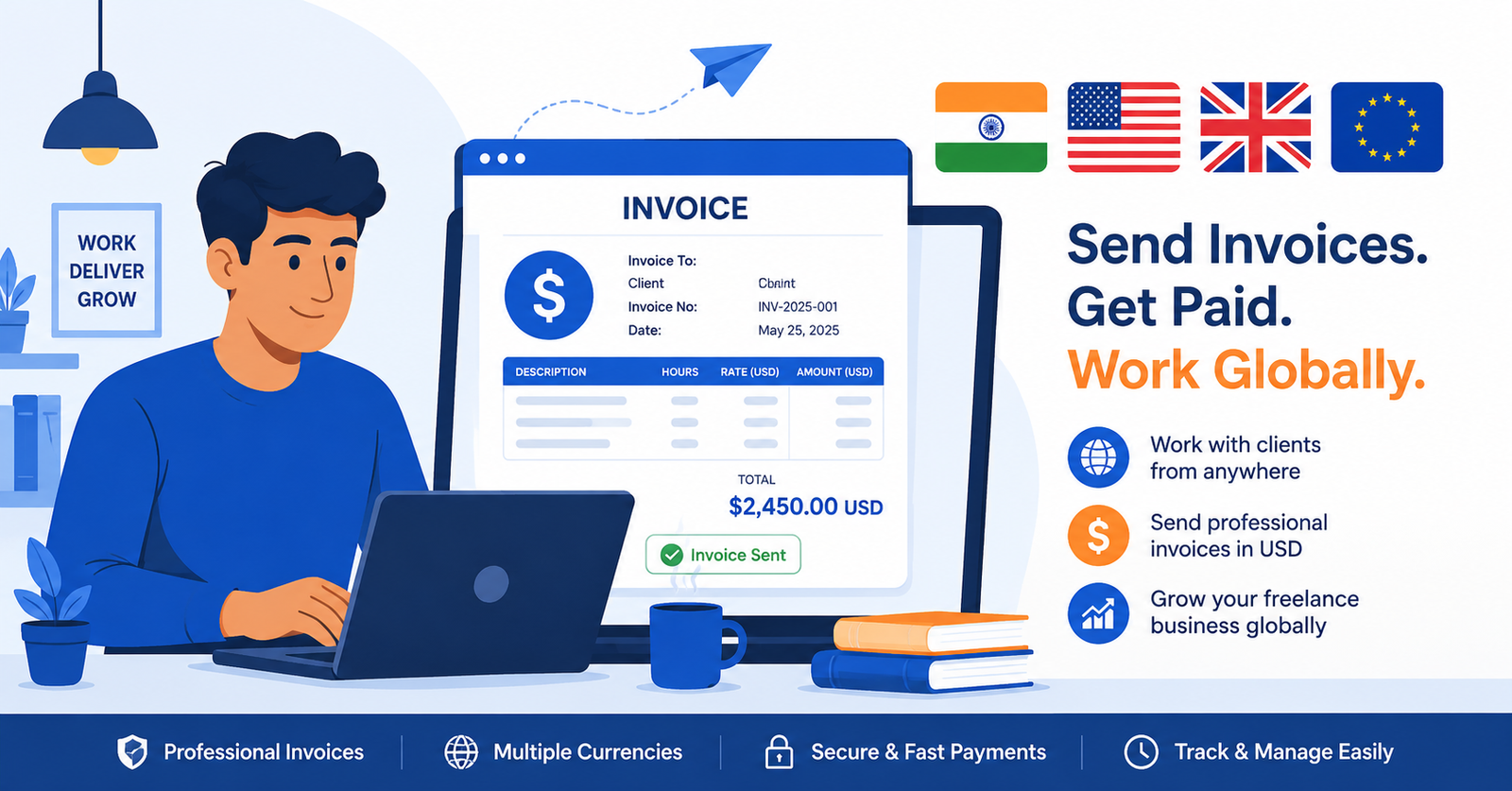
    Finishing a project for a client in London, San Francisco, or Dubai is exciting. Sending them a professional invoice and actually getting paid without confusion about GST, forex, or legal compliance is where most Indian freelancers hit a wall.

    If you have ever wondered whether to charge GST on a foreign invoice, what a LUT bond is, how to receive payment in USD legally, or what the invoice itself should look like, this guide covers all of it in plain language. And at the end, you will know exactly how to create a compliant international invoice in under 60 seconds, for free.

    Can Indian Freelancers Invoice International Clients?

    Yes absolutely. Freelancing and exporting services internationally from India is completely legal. In fact, export of services is one of the government’s most actively promoted economic activities. The legal framework covers it clearly under the Integrated Goods and Services Tax (IGST) Act and the Foreign Exchange Management Act (FEMA).

    What changes when you bill an overseas client versus a domestic one is the tax treatment, the invoice format, and the payment documentation you need to maintain. None of it is complicated once you understand the framework, and this guide maps all of it out.

    Does GST Apply to International Invoices from India?

    This is the question every Indian freelancer asks first,t and the answer surprises many people.

    Export of services is “zero-rated” under GST. This means GST applies but at a rate of 0%. You do not charge your foreign client any CGST, SGST, or IGST. The Indian government effectively removes the GST burden on exports to keep Indian services competitive globally.

    The official definition of “export of services” under GST requires all five conditions to be met:

    1. The supplier of the service is in India
    2. The recipient of the service is outside India
    3. The place of supply is outside India
    4. Payment is received in convertible foreign currency (USD, EUR, GBP, etc.) OR in Indian Rupees when permitted under RBI guidelines.
    5. The supplier and recipient are not mere establishments of the same entity

    If your freelance or agency work meets all five conditions, and it almost certainly does for standard international client work, your invoices qualify as zero-rated exports.

    Practical result: Your invoice to an overseas client shows ₹0 GST (or simply states “Export of Services Zero Rated Supply under IGST Act”). No IGST charged. No CGST. No SGST.

    Read Also: How to Index Your Page in Google

    LUT Bond: Why You Need One Before Billing International Clients

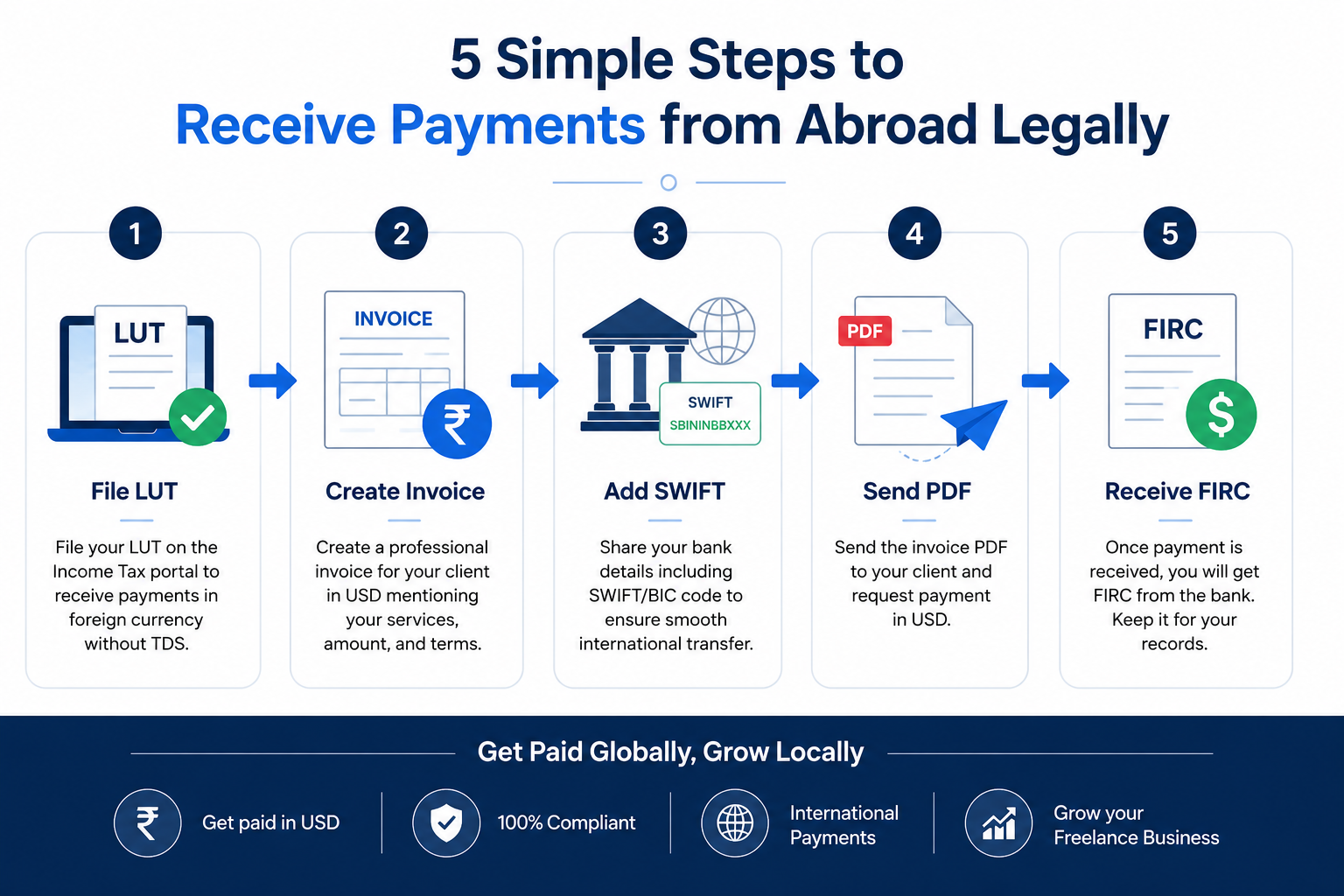
    Here is something most guides skip entirely: you need to file a Letter of Undertaking (LUT) with the GST department before issuing zero-rated export invoices without paying IGST.

    What is a LUT Bond?

    A Letter of Undertaking (LUT) is a declaration you file with the GST portal stating that you will export your services/goods and comply with all GST regulations and that you will not collect IGST from foreign clients.

    Without a valid LUT on file, the technically correct approach is to charge 18% IGST and then claim a refund from the government later. This is slow, cash-flow negative, and unnecessarily bureaucratic. Filing a LUT removes this requirement entirely:y your export invoices go out at zero tax, and you have no refund process to manage.

    Who Needs to File a LUT?

    Any GST-registered freelancer, agency, or business that exports services and wants to invoice without collecting IGST.

    If you are below the GST registration threshold (currently ₹20 lakh annual turnover for most states), you are not required to register for GST and therefore do not need a LUT. Simply issue invoices without any GST.

    How to File a LUT (Step-by-Step)

    Step 1: Log in to the GST portal at gst.gov.in

    Step 2: Go to Services → User Services → Furnish Letter of Undertaking (LUT)

    Step 3: Select the financial year for which you are filing

    Step 4: Fill in the declaration form. Provide two witnesses (usually employees, directors, or partners)

    Step 5: Sign with your Digital Signature Certificate (DSC) or EVC (Aadhaar OTP)

    Step 6: Submit. You will receive an ARN (Application Reference Number) immediately

    Step 7: Download your acknowledged LUT. This is valid for the entire financial year (April to March)

    LUT filing is free of cost no government fee. It typically takes 5–10 minutes on the GST portal. File it once per financial year.

    Create Invoice

    What Should an International Invoice from India Include?

    An international invoice from an Indian freelancer or business needs to contain specific information to be legally compliant under both Indian law and accepted globally.

    Mandatory Fields for International Export Invoices

    Field Details
    Invoice Number Sequential, unique per year (e.g., INV-2026-001)
    Invoice Date Date of issue
    Your Name/Company Full legal name as registered
    Your GSTIN If GST registered
    Your Address Complete Indian address
    PAN Number Recommended for foreign remittance tracking
    Client Name Full legal name of overseas client
    Client Address Complete overseas address
    Client Country Essential for export classification
    Description of Services Clear description, ideally with SAC code
    Currency Clearly stated (USD, EUR, GBP, etc.)
    Amount In agreed foreign currency
    GST “Zero Rated Export — Nil IGST under LUT” OR “Not liable to GST (below threshold)”
    Payment Details Bank account, SWIFT/IFSC, or international payment link
    Due Date Standard: Net 15 or Net 30
    LUT Reference Number Include if GST registered and LUT filed

    What Currency Should You Bill In?

    Bill your international clients in their local currency or U, SD whichever you agreed on. This is standard global practice and expected by most overseas clients.

    From InvoBill, you can switch the currency to USD, EUR, GBP, JPY, AUD, CAD, or AED in one click. Your invoice amount shows in that currency;ncy your client sees a clean, professional document in the currency they work with every day.

    Read Also: GST Invoice for Freelancers India: Complete 2026 Guide

    How to Receive International Payments Legally in India

    Invoicing is only half the equation. Receiving that payment in compliance with FEMA (Foreign Exchange Management Act) regulations is the other half.

    Accepted Methods for Receiving International Payments

    Wire Transfer (SWIFT): The most common method for large international payments. Your client sends money from their bank directly to your Indian bank account. You need to provide your account number, bank name, branch address, IFSC code (for domestic routing), and SWIFT code (for international routing provided by your bank).

    PayPal: Widely used for small to mid-size freelance payments. Note that PayPal to Indian bank withdrawals have currency conversion fees of 2–4%. For amounts over USD 1,000, bank wire transfer is usually more cost-effective.

    Wise (formerly TransferWise): Excellent for receiving USD, EUR, or GBP at near-interbank rates. Gives you a “local” bank account in the client’s country; they pay as a domestic transfer, and you receive in INR at a competitive rate.

    Razorpay / PayU International: India-first payment platforms that now support international payments. Good option if your client prefers a card payment link.

    Crypto: Legal in India but treated as an asset, not a currency. Payments received in crypto are taxable as capital gains or business income depending on classification. Not recommended unless you specifically understand the tax implications.

    What is FIRC and Why Do You Need It?

    FIRC stands for Foreign Inward Remittance Certificate, a document issued by your Indian bank confirming that foreign currency has been received in your account.

    Why it matters:

    • Required for zero-rated GST export service classification
    • Needed if you ever face a GST audit on your international invoices
    • Used in certain FEMA compliance filings
    • Acts as proof of export income for income tax purposes

    How to get your FIRC: When you receive an international payment, ask your bank to issue a FIRC or FIRS (Foreign Inward Remittance Statement). Most major Indian banks (SBI, HDFC, ICICI, Axis) generate this automatically for wire transfers above a threshold. For PayPal and Wise, the transaction history serves as a substitute for informal purposes, though a formal FIRC is only issued by banks for direct wire transfers.

    Keep every FIRC. Store them by financial year. They are the audit trail that proves your international income qualified as zero-rated export.

    Handling TDS on International Freelance Payments

    Some Indian clients (companies filing TDS returns) deduct tax at source under Section 194J (professional fees) or Section 194C (contractor fees) before paying you even on rupee invoices.

    For international clients, TDS generally does not apply from their end since they are outside India’s tax jurisdiction. However, if you are receiving payment through an Indian entity acting as an intermediary (such as an Indian subsidiary of a foreign company paying you), TDS may still apply.

    The practical takeaway: TDS is primarily a domestic India concern. For true export clients paying from overseas, you receive the full invoice amount without deduction.

    Read Also: CGST vs SGST vs IGST: Which Tax to Charge on Your Invoice?

    What Invoice Format Do International Clients Expect?

    Overseas clients, especially in the US, UK, EU, and Australia, expect a clean, professional invoice that clearly states the amount owed, the currency, the bank or payment details, and a due date. They do not expect to see CGST and SGST breakdowns. They do not need to see your GSTIN (though you can include it for your own records).

    The key elements that impress international clients:

    • Clean PDF — not a screenshot, not a WhatsApp photo of a handwritten bill
    • Your company logo or name prominently at the top
    • Clear description of what was delivered (e.g., “Website Design and Development 5 Pages March 2026 Project”)
    • Amount clearly stated in agreed currency (e.g., USD 2,500)
    • Bank details or payment link for how they send money
    • Payment due date — Net 15 or Net 30 is globally standard
    • Invoice number — clients need this for their accounts payable system
    • Your full address — required for their accounting department

    How to Create an International Invoice for Free Using InvoBill

    InvoBill lets you create a professional international invoice in under 60 seconds, with no signup, no subscription, no watermark.

    Step-by-step for international invoices:

    Step 1: Open InvoBill’s free invoice generator in your browser

    Step 2: Under “Your Business Details,” enter your name, Indian address, GSTIN (optional), email, and upload your logo

    Step 3: Under “Client Details,” enter your overseas client’s name and address. Leave GSTIN blank (they are not Indian-registered)

    Step 4: Under “Invoice Information,” set the currency to USD, EUR, GBP, or your agreed currency using the dropdown. Enter your invoice number, date, and payment due date.

    Step 5: Under “Line Items,” describe your service clearly (e.g., “Logo Design — 3 Concepts + Final Files”). Set GST to 0% (zero-rated expo; rt). No tax applied.s

    Step 6: Under “Payment & Terms,” add your bank details (including SWIFT code for international transfers) or your international payment link (PayPal, Wise, etc.)

    Step 7: In Terms & Conditions, write your payment terms: “Payment due within 15 days. Export of Services Zero Rated under GST LUT [your LUT reference number].”

    Step 8: Preview the invoice in real time, then click Download PDF Invoice

    Your client receives a clean, professional invoice. Your accounts stay compliant. And it costs you exactly ₹0.

    Create Your International Invoice Free → InvoBill

    Common Mistakes Indian Freelancers Make on International Invoices

    Mistake 1: Charging 18% IGST on export invoices.ces Export of services is zero-rated. Charging GST on a foreign client creates complexity for them and is technically incorrect if you hold a valid LUT. Solution: File your LUT before sending international invoices.

    Mistake 2: Sending invoices in INR to USD/EUR clients. Your London client budgets in GBP. Sending a ₹1,85,000 invoice confuses them and delays payment. Always invoice in the agreed foreign currency. InvoBill handles the currency switch automatically.

    Mistake 3: No payment due date on the invoice. International clients run structured accounts payable cycles. Without a due date, your invoice gets filed for “whenever.” Write Net 15 or Net 30 on every invoice. Clients who know the due date pay an average of 8 days faster.

    Mistake 4: Missing your SWIFT code in bank details. Your Indian IFSC code is for domestic transfers. International wires need your bank’s SWIFT code. Contact your bank branch or check the bank website for this. Without it, international wire transfers will bounce or be delayed.

    Mistake 5: No LUT filed but claiming zero-rated export status. If you are GST registered and issue zero-rated export invoices without a valid LUT on file, you are technically required to pay IGST first and claim a refund. File the LUT (it is free, takes 10 minutes) before sending your first international invoice.

    Mistake 6: Not keeping FIRCs and payment records. Three years from now, if your income tax return is scrutinised and you claimed export income, you need the documentary trail: invoices + FIRCs + bank statements. Maintain a folder per financial year.

    Conclusion

    Billing international clients from India is entirely legal, increasingly common, and once you understand the framework, it’s entirely straightforward. The key steps are:

    1. Confirm your work qualifies as “export of services” under GST
    2. If GST-registered, file your LUT before sending international invoices (free, takes 10 minutes)
    3. Invoice in your client’s currency with clear bank or payment link details
    4. Receive payment through authorised channels and collect your FIRC
    5. Maintain a financial-year-wise record of invoices and remittances

    The invoicing itself takes under 60 seconds on InvoBill multi-currency, zero-tax, professional PDF, no account needed.

    If you have been hesitating to take international projects because the billing seemed complicated, that hesitation ends today.

    Create Your International Invoice Free on InvoBill →

    FAQ

    Q: Do I need GST registration to invoice international clients?

    A: No, if your annual turnover is below ₹20 lakh, you are not required to register for GST. Issue a regular invoice without any GST. If you are GST registered, file a LUT and issue zero-rated export invoices.

    Q: Can I invoice in USD from India?

    A: Yes. Indian freelancers and businesses can invoice international clients in USD, EUR, GBP, or any agreed foreign currency. Under FEMA, you must receive the payment through authorised banking channels (not cash). Tools like InvoBill let you create multi-currency invoices in one click, with no calculation required.

    Q: What is the GST rate for export of services from India?

    A: Export of services is zero-rated under IGST; the effective GST rate is 0%. If you hold a valid LUT (Letter of Undertaking), you issue invoices without collecting any IGST. If you are below the GST registration threshold (₹20 lakh for most states), GST does not apply at all.

    Q: What is FIRC in freelancing?

    A: FIRC (Foreign Inward Remittance Certificate) is a document issued by your Indian bank confirming receipt of international foreign currency payment. It serves as proof of export income and is important for GST audit trails and income tax documentation. Banks issue FIRCs for wire transfers automatically; for PayPal/Wise, transaction confirmations serve as informal substitutes.

    Q: Can I use InvoBill to create USD invoices for international clients?

    A: Yes. InvoBill supports USD, EUR, GBP, JPY, AUD, CAD, AED and more. Select your currency from the dropdown, set GST to 0% (zero-rated export), add your SWIFT banking details, and download a professional PDF, all free, no signup required.

    Q: How do I show zero-rated GST on my export invoice?

    A: In the GST column of your invoice, enter 0% for all line items. In your Terms & Conditions field, note: “Export of Services, Zero Rated Supply under Section 16 of IGST Act, 2017. LUT Reference: [your LUT number].” This is the standard compliant format accepted by clients and Indian tax authorities.

  • How to Index Your Page in Google: The Complete Step-by-Step Guide (2026)

    Your website is live. Your pages are published. But Google has no idea they exist.

    That is the silent problem behind thousands of Indian business websites with carefully built pages that never get crawled, never get indexed, and never appear in search results. If Google cannot find your page, it cannot rank your page. And if it cannot rank your page, no customer can find you through search.

    How to index your page in Google is one of the most searched technical SEO questions from website owners, bloggers, and small business operators across India, and the confusion is understandable. Google’s indexing process is not automatic for every page, every time. There are specific triggers, technical requirements, and submission methods that directly control whether your content enters Google’s index.

    By the end of this guide, you will know exactly how Google’s indexing process works, the fastest methods to get your pages indexed in 2026, why some pages get ignored even after submission, and how to fix every common indexing problem without hiring an expensive developer.

    Let us start from the beginning.

    What Does “Indexing” Mean and Why It Controls Your Google Rankings

    Before diving into the how, you need to understand the what.

    Google indexing is: The process by which Google discovers, reads, and stores a copy of your web page in its searchable database called the Google Index so it can be retrieved and displayed in search results when a user searches for a relevant query.

    Think of the Google Index as an enormous library. Google’s bots (called Googlebot or crawlers) are the librarians. They visit your website, read your content, take a copy, and file it in the library. When someone searches “digital marketing agency Bihar” or “best SEO company in India,” Google searches its library, not the live web, to return results.

    If your page is not in the library, it simply does not exist in Google’s world.

    The three-stage process works like this:

    Step 1 — Discovery: Google finds out your URL exists (through sitemaps, internal links, or backlinks from other sites).

    Step 2 — Crawling: Googlebot visits your URL and reads the page content, code, and links.

    Step 3 — Indexing: Google processes the crawled data and stores it in the index (or decides to skip it).

    Only indexed pages can appear in Google search results. This is why getting your page indexed is the first requirement, not the last step of SEO.

    How to Index Your Page in Google: 7 Proven Methods That Work in 2026

    Method 1: Submit Your URL Directly Through Google Search Console

    Google Search Console (GSC) is a free tool from Google that gives you direct communication with Googlebot. The URL Inspection tool inside GSC is the fastest official method to request indexing for any specific page.

    How to use it:

    Step 1: Go to Google Search Console and sign in with your Google account.

    Step 2: Add and verify your website property (if not done already). Verification takes 2–5 minutes using an HTML tag, Google Analytics, or a DNS record.

    Step 3: Paste your target page URL into the search bar at the top of GSC.

    Step 4: Click “Request Indexing” after the tool checks your URL.

    Step 5: Google places your URL in a priority crawl queue. Most pages get indexed within 24–72 hours after a direct request.

    Important: GSC allows roughly 10–12 URL inspection requests per day. Use this for new pages, recently updated pages, or pages you need indexed urgently. Do not use it for bulk submissions; that is what sitemaps are for.

    Read Also: SEO vs Paid Ads — Which One Should Indian Businesses Choose?

    Method 2: Submit an XML Sitemap to Google Search Console

    A sitemap is a file that lists every important URL on your website; it is essentially a roadmap you hand directly to Google. Submitting a sitemap is the most reliable way to ensure Google knows about all your pages, not just the ones it discovers by chance.

    How to submit your sitemap:

    Step 1: Generate your sitemap. If you use WordPress with Yoast SEO or RankMath, your sitemap is already created automatically, usually at yourdomain.com/sitemap.xml or yourdomain.com/sitemap_index.xml.

    Step 2: Open Google Search Console. Go to “Sitemaps” in the left panel.

    Step 3: Enter your sitemap URL and click “Submit.”

    Step 4: Check back after 24 hours. GSC will show how many URLs Google discovered versus how many were indexed.

    Pro tip: If you have a large site (100+ pages), create separate sitemaps by content type: one for blog posts, one for service pages, one for product pages. This gives Google a cleaner roadmap and makes diagnosing indexing issues much easier.

    Also add your sitemap URL inside your robots.txt file:

    Sitemap: https://yourdomain.com/sitemap.xml

    This ensures any crawler, not just Googlebot, can find your sitemap automatically.

    Method 3: Build Strong Internal Links to New Pages

    This is the most underrated indexing method that most website guides skip entirely. Googlebot does not just visit URLs;s it already knows it follows links. If a new page on your site has zero internal links pointing to it, Googlebot may never find it.

    How internal linking helps indexing:

    • Google crawls your high-authority pages frequently (homepage, popular blog posts, service pages)
    • When those pages link to a new page, Googlebot follows the link and discovers the new URL
    • The more internal links pointing to a new page, the faster it gets crawled and indexed
    • Internal links also pass “link equity” which signals to Google that the linked page has value

    Practical rule: Every new page or blog post you publish should receive at least 2–3 internal links from existing, already-indexed pages on your website within 24 hours of publishing.

    For a service-based business like a digital marketing agency, this means linking from your homepage, your “Services” page, and your most popular blog post whenever you publish new content.

    Method 4: Get Backlinks From Already-Indexed External Pages

    When an already-indexed external website links to your new page, Google discovers your page through that link. This is called “backlink discovery”, and it is one of the oldest and most reliable indexing triggers in SEO.

    Where to get fast indexing backlinks:

    • Social media profiles: Share your new page on LinkedIn, Twitter/X, Facebook Business Page, and Instagram bio (wherever applicable). These platforms are crawled frequently.
    • Google Business Profile posts: If you have a Google Business Profile (formerly Google My Business), post your new page URL there. Google crawls GBP posts within hours.
    • Web 2.0 platforms: Medium, Blogger, Tumblr create a short post with a link back to your new page.
    • Forum signatures and community posts: Quora, Reddit (where relevant and allowed), industry forums.
    • Press release distribution: For important pages, submit a brief press release to PR distribution services; es these are crawled fast and generate multiple backlinks simultaneously.

    Even one backlink from a high-authority indexed site can trigger Googlebot to visit and index your page within a few hours.

    Method 5: Fix Your robots.txt File;e It May Be Blocking Google

    Here is a surprisingly common problem: websites that accidentally block Googlebot through a misconfigured robots.txt file. The robots.txt file tells crawlers which pages they are and are not allowed to visit. If yours is incorrect, Google cannot index those pages no matter what else you do.

    Check your robots.txt at: yourdomain.com/robots.txt

    A correctly configured basic robots.txt looks like this:

    User-agent: *
    Disallow:
    Sitemap: https://yourdomain.com/sitemap.xml

    Disallow: with nothing after it means “block nothing”; Googlebot can crawl all pages.

    Dangerous examples to watch for:

    Disallow: /

    This blocks ALL crawling of your entire site. A single slash after Disallow is one of the most damaging SEO mistakes possible.

    Disallow: /blog/

    This blocks all blog pages. If you wrote this to block a staging folder and forgot to update it, your entire blog is invisible to Google.

    Use Google Search Console’s “robots.txt Tester” (under the old Search Console tools) or a free online robots.txt checker to verify yours is correct.

    Read Also: Web Development vs Website Builders — Which One Is Right for Your Business?

    Method 6: Remove Noindex Tags From Pages You Want Indexed

    Every indexed page must NOT have a noindex meta tag. This tag explicitly tells Google “do not include this page in your index.” It is useful for thank-you pages, admin pages, and staging environments, but if it accidentally ends up on a page you want ranked, that page will never appear in search results.

    How to check for noindex tags:

    Method 1: Open your page, right-click → “View Page Source” → press Ctrl+F and search for noindex. If you find <meta name="robots" content="noindex"> or any variation, remove it.

    Method 2: Use the URL Inspection tool in Google Search Console. It explicitly tells you whether a page is indexable or blocked by a noindex tag.

    Method 3: In RankMath or Yoast SEO (for WordPress sites), open each page’s SEO settings and confirm the “Allow Search Engines to Index This Page” toggle is switched ON.

    WordPress users running WooCommerce: Check that your product pages, category pages, and checkout confirmation pages have the correct index settings. It is common for staging environments to be set to noindex and then launched live without reversing that setting.

    Method 7: Improve Content Quality and Page Value

    Google does not index every page it crawls. If a page is thin (under 300 words with no real value), duplicate (same content as another page on your site), or low-quality, Google may crawl it and choose NOT to add it to the index.

    This is not a bug it is Google’s quality filter working exactly as designed.

    Minimum requirements for a page Google will index and keep indexed:

    • At least 400–600 words of original, useful content (for blog posts: 1,200 words minimum for competitive topics)
    • A unique, descriptive title tag not duplicated across other pages
    • A relevant, keyword-informed meta description
    • At least one image with descriptive alt text
    • At least 2–3 internal links
    • No copied or duplicate content from other websites or other pages on your own site
    • A clear topic focus on one page, one primary topic

    For Indian small businesses: If your service pages have only 100–200 words describing your service, Google may crawl them but choose not to index or rank them. Expanding each service page to 600–800 words with genuine detail about what you offer, who you serve, and what results clients get is one of the fastest ways to improve both indexing and ranking.

    How Long Does Google Take to Index a Page?

    This is the most common follow-up question, and the honest answer is: it varies.

    Method Used Typical Indexing Time
    URL Inspection Tool (GSC) — New page 24–72 hours
    URL Inspection Tool (GSC) — Updated page 4–24 hours
    Sitemap submission only 3–14 days
    Internal links only (no submission) 3–21 days
    External backlink discovery 1–7 days
    No submission, no links, no sitemap Weeks to months (or never)

    A new website with no authority, no backlinks, and no sitemap submission can take 4–8 weeks to have its pages indexed. An established website with regular Google Search Console submissions typically gets new pages indexed within 1–3 days.

    Why Your Page Is Not Getting Indexed And How to Fix It

    If you have submitted your page and it is still not appearing in Google’s index after 2–4 weeks, one or more of these reasons applies.

    Reason 1: robots.txt is blocking the page Fix: Check yourdomain.com/robots.txt and remove any Disallow rules covering that page.

    Reason 2: Noindex meta tag is present Fix: Remove the <meta name="robots" content="noindex"> tag from the page’s HTML head section.

    Reason 3: The page has no internal links pointing to it (orphan page) Fix: Add 2–3 internal links from your homepage, sitemap page, or relevant blog posts.

    Reason 4: Thin or duplicate content Fix: Expand the page with original, useful content. Use a duplicate content checker (Copyscape or Siteliner) to identify and fix duplicate pages.

    Reason 5: The page returns a non-200 HTTP status code Fix: A page returning 301, 302, 404, or 500 errors cannot be indexed at that URL. Use Google Search Console’s Coverage report to identify and fix status code errors.

    Reason 6: Canonical tag pointing to a different URL Fix: If <link rel="canonical" href="https://differenturl.com/page/"> is set, Google treats the canonical URL as the “correct” version and may not index the current page. Remove incorrect canonicals or update them to point to the current page.

    Reason 7: Site is new and has very low authority Fix: Build 5–10 quality backlinks from relevant, established websites. Write guest posts, get listed in business directories, submit to local Indian business listings like JustDial, Sulekha, or IndiaMart.

    Reason 8: JavaScript rendering issues Fix: If your website is built entirely in JavaScript (React, Angular, Vue) and relies on client-side rendering, Googlebot may struggle to read your content. Switch to server-side rendering (SSR) or static site generation (SSG) for critical pages.

    Read Also: How to Get Your First 100 Customers Online

    Technical SEO Checklist Before Requesting Indexing

    Before submitting any page for indexing, run through this checklist. Submitting a page with technical errors wastes your request quota and slows down your results.

    • Page loads successfully (HTTP 200 status); verify in browser developer tools or Google Search Console
    • No noindex tag in the page source
    • No Disallow rule in robots.txt blocking this URL
    • Canonical tag (if present) points to this page’s own URL
    • Page has at least 400 words of original content
    • Title tag is unique and includes the primary keyword
    • Meta description is present and accurately describes the page
    • Page has at least one image with descriptive alt text
    • At least 2 internal links on the page pointing to other pages on your site
    • At least 2 internal links from other already-indexed pages pointing TO this page
    • Page is listed in your XML sitemap
    • Page loads in under 3 seconds (Core Web Vitals: LCP under 2.5 seconds is the Google standard)
    • Page is mobile-responsive. Google uses mobile-first indexing, meaning it indexes and ranks based on the mobile version of your page.

    All 13 points checked? Now submit your URL.

    How MaaJanki Web Tech Helps Businesses Fix Indexing Problems

    From working with small businesses across Bihar and India, the most common indexing problem we encounter is not missing sitemaps or wrong robots.txt files; it is thin service pages that Google crawls and quietly ignores.

    A travel agency in Patna had 12 service pages, each with 80–120 words. All 12 were crawled. Zero were indexed. After expanding each page to 600–800 words with genuine service details, client benefits, and location-specific content, 11 of 12 pages were indexed within 10 days. Nine ranked on page 1 within 90 days for local travel queries.

    That is the reality of indexing in 2026: Google indexes value, not just URLs.

    If your website is facing indexing issues, coverage report errors, or pages stuck in the “Discovered Currently Not Indexed” limbo in Google Search Console, MaaJanki Web Tech provides complete technical SEO audits and fixes for Indian businesses.

    WhatsApp us your website URL for a free 10-minute SEO index check: WhatsApp MaaJanki Web Tech Email: contact@maajankiwebtech.com

    We handle everything from GSC setup and sitemap submission to full technical SEO fixes, content expansion, and ongoing indexing monitoring.

    Conclusion

    Getting your page indexed in Google is the foundation every other SEO effort depends on. No ranking. No traffic. No leads. Without indexing, none of it works.

    The seven methods covered in this guide Google Search Console URL submission, sitemap submission, internal linking, backlink discovery, fixing robots.txt, removing noindex tags, and improving content quality cover every real-world indexing scenario you will encounter as a website owner in 2026.

    Start with the fastest fix: open Google Search Console, paste your URL into the inspection tool, and hit “Request Indexing.” Then work through the technical checklist above to make sure there are no hidden blockers preventing Google from including your page in its index.

    How to index your page in Google is no longer a mystery after this guide. Now it is simply a matter of execution.

    If you need help, MaaJanki Web Tech is here for Indian businesses of every size. Website development, SEO, technical audits, content writing, and digital marketing all from Champaran, Bihar, serving clients across India.

    FAQ

    Q: How do I check if my page is indexed by Google?

    A: Type site:yourdomain.com/your-page-url directly into Google Search. If the page appears in results, it is indexed. You can also use the URL Inspection tool in Google Search Console, which gives you a more detailed status including when the page was last crawled, what Google’s cached version looks like, and whether any indexing issues were detected.

    Q: Can I force Google to index my page immediately?

    A: You cannot force immediate indexing, but you can accelerate it significantly. The fastest method in 2026 is the URL Inspection tool in Google Search Console → “Request Indexing.” This puts your page in a priority crawl queue. Combined with a backlink from a high-authority indexed page, most pages are indexed within 24–48 hours.

    Q: Why does Google keep removing my page from the index?

    A: Pages that Google indexes and then removes are typically flagged for thin content, duplicate content, significant quality issues, or server errors. If your page disappears from the index repeatedly after being re-submitted, the core issue is content quality. Expand the page significantly, add original insights, structured data, and genuine user value, then re-request indexing.

    Q: Does buying backlinks help with Google indexing?

    A: Backlinks from indexed websites can trigger faster crawling and indexing of your pages. However, buying low-quality backlinks from link farms or spam sites carries a significant Google penalty risk. For indexing purposes, even a few shares on social media, a guest post on a relevant blog, or a listing in a reputable business directory achieves the same result without the risk.

    Q: How many pages should I submit to Google at once?

    A: For individual page submissions via URL Inspection, limit yourself to 10–12 per day. For bulk submissions, use your XML sitemap; it has no practical limit on the number of URLs, and Google processes it on its own schedule. If you have 500 new pages to index, sitemap submission is the correct approach, not individual URL inspection requests.

    Q: Does social media sharing help with Google indexing?

    A: Yes, indirectly. Google’s crawlers visit social platforms frequently. When you share a new page URL on LinkedIn, Twitter/X, or Facebook, the link becomes discoverable by Googlebot through those platforms, which can accelerate indexing. Social shares do not directly improve rankings, but they can trigger faster discovery and crawling of new pages.

  • Landing Page vs Full Website: Which One Drives More Leads for Your Business?

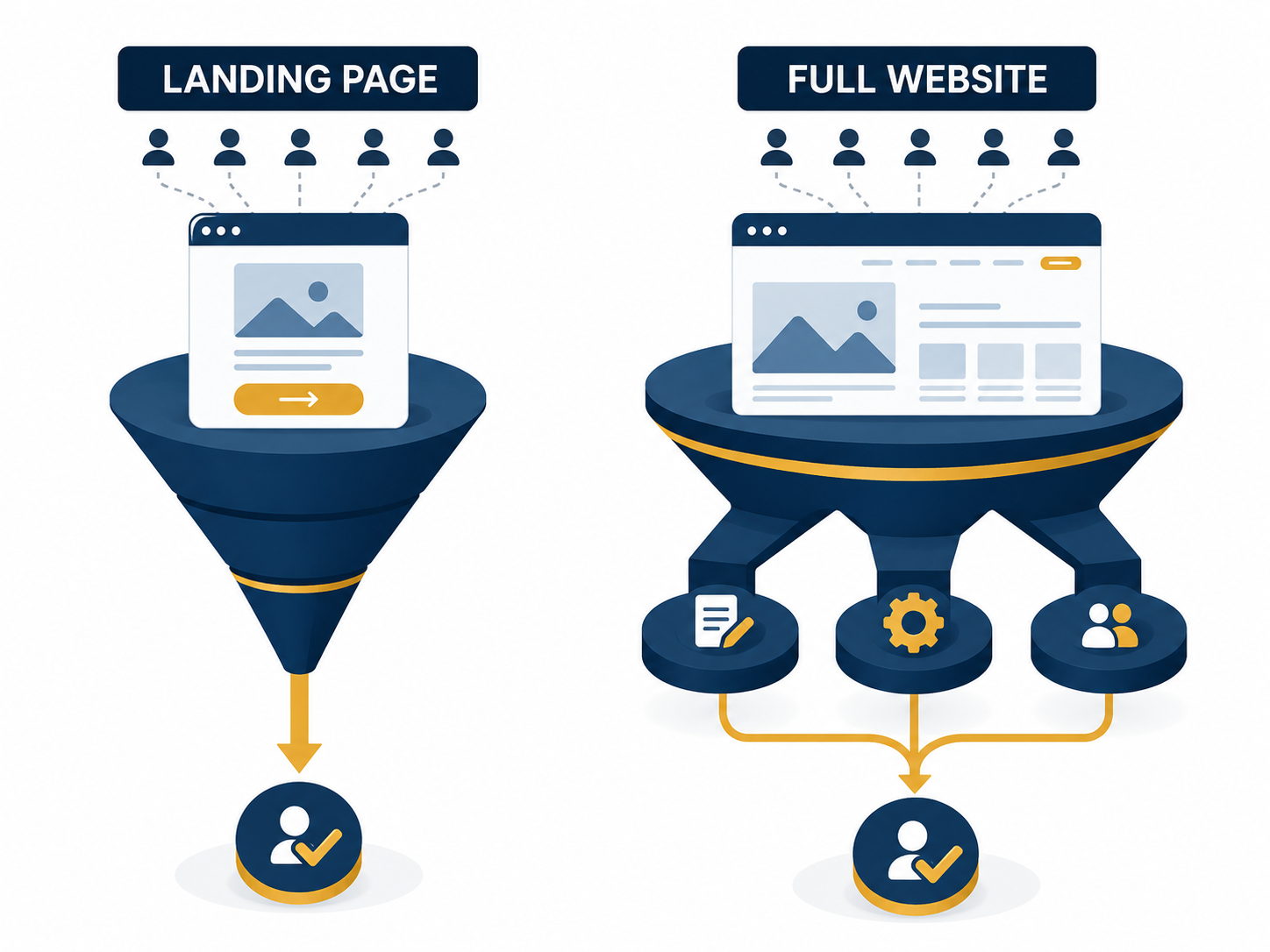
    A landing page and a full website are not competing products they are two different tools built for two different jobs. A landing page is a single-purpose lead-capture machine designed for one campaign, one offer, one action. A full website is your complete business presence, built to inform, rank on Google, and serve every type of visitor at every stage of their decision. Choosing wrong or choosing one when you need both is the single most common reason Indian businesses waste ad spend and lose enquiries.

    This guide breaks down exactly when a landing page wins, when a full website wins, what real businesses have seen in conversion data, and why the smartest answer for most growing businesses in 2026 is not “either/or” but a structured combination of both built to work together.

    You just spent ₹15,000 on Google Ads this month. The clicks came in. The enquiries did not. Somewhere between the ad click and the contact form, your potential customer disappeared, and the page they landed on is very likely the reason why.

    This is the exact problem this article solves. Landing page vs full website is not a theoretical debate it is a decision that directly affects how many leads convert from every rupee you spend on marketing.

    By the end of this article, you will know exactly which one to use for your next campaign, which one to use for your long-term brand presence, and how MaaJanki Web Tech structures both for clients who want maximum leads without wasted ad spend.

    Landing Page vs Full Website: The Quick Answer

    A landing page is a single, focused page built around one offer with one call-to-action designed to convert visitors from a specific ad or campaign. A full website is a multi-page presence (home, services, about, blog, contact) built for long-term branding, SEO, and serving every type of visitor. For paid ad campaigns and specific offers, landing pages convert 2–3x higher. For organic search traffic and brand trust, a full website wins. Most growing businesses need both, not one instead of the other.

    What Is a Landing Page? (And What It Is Not)

    A landing page is a standalone web page with exactly one goal: to convert the visitor into a lead or sale. No navigation menu. No distractions. No other pages to click into.

    A real landing page includes:

    • One headline that states the offer or benefit clearly
    • One supporting section that builds trust (testimonials, numbers, guarantees)
    • One call-to-action repeated 2–3 times down the page
    • A lead capture form or WhatsApp click-to-chat button
    • Zero navigation links are pulling the visitor away

    What a landing page is NOT:

    • It is not your homepage
    • It is not meant to explain everything about your business
    • It is not built for SEO ranking on broad keywords
    • It is not a replacement for a full website

    Honest example: A Pune-based interior design studio running a Diwali offer campaign built a single landing page: “Get Your Living Room Redesigned Before Diwali Free Consultation.” No menu. No “About Us” link. Just the offer, three before-and-after photos, a testimonial, and a WhatsApp button. That page converted at 9.2% from paid traffic, nearly triple what their full website homepage converted at for the same ad spend.

    What Is a Full Website? (And Why It Still Matters in 2026)

    A full website is your complete digital business presence, multiple pages working together to inform, build trust, and convert visitors who are at different stages of deciding whether to work with you.

    A full website typically includes:

    • Homepage
    • About / Our Story page
    • Services or Products pages
    • Portfolio or Case Studies
    • Blog (critical for long-term SEO)
    • Contact page with multiple contact methods
    • Testimonials or reviews page

    Why a full website cannot be replaced by a landing page:

    • Google ranks websites with depth and topical authority, not single pages
    • Visitors researching your business (not from an ad) expect to explore freely
    • A blog drives long-term organic traffic that a landing page cannot generate
    • B2B buyers specifically look for an “About” page and case studies before trusting a vendor

    Honest example: A Surat-based B2B packaging manufacturer relied only on a single-page website for two years. They ranked nowhere on Google for “packaging manufacturer Surat” because Google had no content depth to evaluate. After building a full website with 12 pages and a blog, they began ranking on page 1 within five months, something a landing page alone could never achieve.

    📖 Read Also: Not sure whether to build a custom site or use a no-code builder for either option? This breaks down the real trade-offs: Web Development vs. Website Builders: Which One Should You Choose?

    Landing Page

    Landing Page vs Full Website: Side-by-Side Comparison

    Factor Landing Page Full Website
    Primary Goal Convert one specific offer Inform, build trust, rank on Google
    Number of Pages 1 5–50+
    Navigation Menu None (intentionally) Full menu and footer links
    Best Traffic Source Paid ads, social campaigns, email Organic search, referrals, direct visits
    SEO Value Very low not built to rank broadly High core SEO and authority asset
    Conversion Rate (Typical) 5–15% from targeted traffic 1–3% from general traffic
    Build Time 3–7 days 2–8 weeks
    Cost Range (India) ₹8,000 – ₹35,000 ₹45,000 – ₹2,50,000+
    Lifespan / Reusability Short built per campaign Long-term core business asset
    Best Use Case Specific offer, product launch, event Brand presence, long-term lead generation

    When a Landing Page Wins: Real Scenarios

    Scenario 1: Running Google Ads or Meta Ads. If you send paid traffic to your full website homepage, you are paying for clicks and losing most of them to a distracted visitor exploring five other pages. A dedicated landing page matching the exact ad promise converts dramatically higher because it removes every distraction.

    Scenario 2: Launching a Specific Offer or Product: A new course, a seasonal discount, a webinar registration, a free consultation, all of these deserve their own focused page. Burying a time-sensitive offer inside a full website’s “Services” page guarantees lower visibility and lower urgency.

    Scenario 3: Testing a New Market or Service Before Full Investment Before building an entire website section for a new service line, a landing page lets you test demand with real ad spend and real conversion data at a fraction of the cost and time.

    Scenario 4: Event Registration or Webinar Signups Single-purpose events need single-purpose pages. Date, time, speaker, registration form, nothing else competing for attention.

    Ready to Build a Website (or Landing Page) That Actually Converts?

    Send us your business goal on WhatsApp, whether it is a single campaign landing page or a full business website — and get a free 10-minute consultation on the right structure for your situation.

    📱 WhatsApp: MaaJanki Web Tech — Chat Now

    📧 Email: info@maajankiwebtech.com

    🌐 Website: maajankiwebtech.com | mjbytech.com

    When a Full Website Wins: Real Scenarios

    Scenario 1: You want to rank on Google Organically Google’s algorithm rewards topical depth, internal linking, and consistent content, none of which a single landing page can provide. If long-term organic traffic is your goal, a full website with a blog is non-negotiable.

    Scenario 2: B2B Buyers Are Researching You B2B decision-makers in India routinely check a vendor’s About page, team page, and case studies before reaching out. A landing page alone signals “this might not be a real, established company”, a credibility risk you cannot afford in B2B sales.

    Scenario 3: You Offer Multiple Services or Products A hospital, school, or multi-service agency cannot compress everything into one page. Different visitors need different information a full website’s structure exists precisely to serve this variety.

    Scenario 4: Building Long-Term Brand Equity A full website becomes more valuable over time, with more blog posts, more backlinks, and more domain authority. A landing page resets to zero relevance the moment its campaign ends.

    📖 Read Also: Once you have decided on your structure, here is how to start turning visitors into your first paying customers: How to Get Your First 100 Customers Online

    The Conversion Data: What Actually Happens in Real Campaigns

    From running paid and organic campaigns for 200+ Indian businesses, the pattern at MaaJanki Web Tech is consistent and worth stating plainly:

    Paid ad traffic → Landing page: Average conversion rate 6–12% Paid ad traffic → Full website homepage: Average conversion rate 1.5–4% Organic search traffic → Full website with blog: Average conversion rate 2–5% Organic search traffic → Standalone landing page: Rarely ranks, minimal organic traffic exists to convert

    The number that should matter most to you: sending paid traffic to a homepage instead of a matching landing page typically cuts your conversion rate by 50–70%. If you are running ads right now and pointing them at your homepage, that single decision is likely costing you more in wasted ad spend than the cost of building a proper landing page.

    This does not mean landing pages are “better”, it means each tool wins on its own terrain. A landing page sent organic search traffic with no other content behind it will simply never get found in the first place.

    📖 Read Also: Trying to decide where your next marketing rupee should go SEO or paid traffic? This comparison settles it: SEO vs. Paid Ads: Which One Is Right for Your Business?

    How to Decide: A Simple Framework

    Ask yourself these four questions in order:

    1. Where is my traffic coming from? Paid ads or a specific campaign link → Landing page, Google search, or general brand awareness → Full website

    2. Am I promoting one specific thing or my whole business? One offer, one product, one event → Landing page Everything I do, my full range of services → Full website

    3. Do I need this to rank on Google long-term? No, this is a short-term campaign → Landing page Yes, I want sustainable organic traffic → Full website

    4. Will buyers need to research and trust me before contacting me? No, the offer itself is the trust-builder → Landing page Yes, they will check my credibility first → Full website

    If you answered “landing page” to most questions, build a landing page for this specific campaign, but do not let it replace your need for a proper full website in parallel.

    The Smartest Strategy in 2026: Use Both, Structured Correctly

    Here is the real insight most agencies will not tell you because it requires more work, not less: the highest-performing Indian businesses do not choose between a landing page and a full website. They run both, connected strategically.

    The structure that works:

    1. Full website as your permanent digital home, SEO foundation, brand trust, all services explained, blog for organic growth
    2. Multiple landing pages built off the same website for specific campaigns, each one linking back to the main site for visitors who want to explore further
    3. Consistent branding across both so visitors recognise they are dealing with the same trusted business
    4. Landing pages refreshed per campaign, while the full website remains a stable, evergreen asset

    Example structure for a typical MaaJanki Web Tech client:

    • maajankiwebtech.com — full website (services, blog, about, portfolio)
    • maajankiwebtech.com/diwali-website-offer — campaign landing page
    • maajankiwebtech.com/free-seo-audit — lead magnet landing page

    This is not duplicate work, it is smart infrastructure. The full website does the long-term job. The landing pages do the short-term, high-intent conversion job. Together, they cover every visitor at every stage.

    What Should You Include on a High-Converting Landing Page?

    If you decide a landing page is right for your next campaign, here is the non-negotiable checklist:

    Above the fold:

    • [ ] Clear headline stating the exact benefit (not a vague tagline)
    • [ ] Supporting subheadline with a specific detail (number, timeframe, guarantee)
    • [ ] Primary call-to-action button visible without scrolling

    Trust elements:

    • [ ] At least one testimonial with a real name and result
    • [ ] Trust badges, certifications, or client logos if available
    • [ ] A specific number or statistic (“Helped 200+ businesses…”)

    Conversion elements:

    • [ ] Lead capture form with minimal fields (name, phone, one qualifying question)
    • [ ] WhatsApp click-to-chat button extremely high response rate in the Indian market
    • [ ] Call-to-action repeated at least 2–3 times down the page

    Technical basics:

    • [ ] Page loads in under 2.5 seconds (paid traffic abandons slow pages instantly)
    • [ ] Mobile-first design, most Indian ad traffic arrives on mobile
    • [ ] Zero navigation menu, no exit points except the conversion action

    What Should Your Full Website Include to Actually Generate Leads?

    A full website that just exists is not the same as a full website that converts. Here is what separates the two:

    • Homepage with a clear value proposition in the first 5 seconds of viewing
    • Service pages with specific outcomes, not vague descriptions — “We helped a Ludhiana retailer grow online sales by 340% in 4 months” beats “We provide quality digital marketing services”
    • A blog with consistent publishing — this is what compounds your organic traffic month after month.
    • Multiple contact paths — phone, WhatsApp, email, and a contact form, never just one
    • Fast load times — Core Web Vitals compliance (LCP under 2.5 seconds) directly affects both Google ranking and conversion rate
    • Social proof throughout, not buried on one isolated testimonials page

    How MaaJanki Web Tech Builds Both Together

    At MaaJanki Web Tech, every client engagement starts with the same question: Where is your traffic coming from, and what is the immediate goal? The answer determines whether we recommend a landing page, a full website, or both working in tandem.

    For clients running paid campaigns: We build dedicated landing pages matched precisely to the ad copy and offer typically delivered in 5–7 days, with A/B test variants for headline and CTA testing.

    For clients building long-term brand presence: We build full websites with SEO foundations, blog infrastructure, and conversion-optimised service pages designed to compound organic traffic over 6–18 months.

    For clients who want maximum ROI: We build the full website first as the foundation, then layer campaign-specific landing pages on top, each one feeding qualified visitors deeper into the main site when they are ready to explore further.

    This dual approach is why MaaJanki Web Tech clients consistently see both immediate campaign conversions and long-term organic growth instead of having to choose one and sacrifice the other.

    Stay Connected with MaaJanki Web Tech

    Get weekly website tips, digital marketing strategies, and exclusive offers for Indian businesses straight to your phone.

    📲 Join our WhatsApp Channel: MaaJanki Web Tech

    📧 Subscribe by Email: info@maajankiwebtech.com

    🌐 Explore our services: maajankiwebtech.com | mjbytech.com

    Conclusion: Stop Choosing Start Structuring

    The real answer to “landing page vs full website” is not a winner. It is a structure. Landing pages win for paid campaigns and specific offers, converting at 2–3x the rate of a general homepage. Full websites win for organic growth, brand trust, and long-term lead generation that compounds month after month.

    The businesses generating the most leads in 2026 are not picking one, they are building a full website as their permanent foundation, then layering focused landing pages on top for every campaign that needs maximum conversion.

    If you are running ads right now and sending traffic to your homepage, that is the first thing to fix. If you do not yet have a full website with a working SEO foundation, that is the next priority right behind it.

    Whichever stage your business is at, the right next step is a clear plan, not a guess.

    FAQ

    Q: Is a landing page cheaper than a full website?

    A: Yes. A landing page in India typically costs ₹8,000–₹35,000 and takes 3–7 days to build, while a full website ranges from ₹45,000–₹2,50,000+ and takes 2–8 weeks. However, cost should not be the deciding factor a landing page cannot replace the SEO value, credibility, and long-term traffic a full website generates. They serve different purposes, not different budgets for the same goal.

    Q: Can I use only a landing page instead of a full website for my business?

    A: For a single short-term campaign, yes, a landing page alone works fine. For an ongoing business that wants Google visibility, customer trust, and long-term lead generation, relying only on a landing page is risky. Without a full website, you have no SEO foundation, no blog to drive organic traffic, and limited credibility for visitors who want to research your business before contacting you.

    Q: Which converts better for Google Ads, a landing page or a full website?

    A: A dedicated landing page consistently converts higher for Google Ads traffic, typically 6–12% compared to 1.5–4% for a full website homepage. This is because landing pages remove distractions and match the exact promise made in the ad. Sending paid traffic to your homepage instead of a matching landing page often cuts conversion rates by 50–70%.

    Q: Do I need a separate landing page for every marketing campaign?

    A: Ideally, yes for any campaign with a distinct offer, audience, or call-to-action. A generic landing page used across multiple unrelated campaigns dilutes relevance and lowers conversion rates. A well-built landing page system reuses the same design template but customises the headline, offer, and proof points per campaign.

    Q: Will a landing page help my website rank on Google?

    A: Generally, no. Landing pages are built for conversion, not for SEO ranking on competitive keywords they typically have thin content and no internal linking structure. If long-term organic search visibility is a goal, that ranking power comes from your full website’s blog and service pages, not from standalone landing pages.

    Q: What is the biggest mistake businesses make between landing pages and full websites?

    A: The most common mistake is sending paid ad traffic directly to a full website homepage instead of a dedicated landing page matching the ad’s exact offer. This single decision routinely cuts conversion rates by half or more, because visitors land on a page with competing navigation links instead of one focused call-to-action.

  • Professional Business Website Cost in India in 2026: The Complete Pricing Guide

    Getting a professional business website in India in 2026 costs anywhere between ₹5,000 and ₹5,00,000+, and the gap is not random. It depends on five critical factors most agencies never explain upfront: the type of website you need, who builds it, the features required, the platform used, and the ongoing support model. This guide breaks every cost tier down with real numbers, so you stop guessing and start making an informed decision.

    Whether you are a first-time business owner exploring options or a growing company ready to upgrade, this pricing guide covers static sites, WordPress builds, WooCommerce stores, custom web applications, and SaaS-based solutions with transparent price ranges, what each tier includes, what it skips, and exactly what to ask before signing any agreement.

    Your competitor just launched a new website. It loads fast, looks sharp on mobile, and probably already ranks on Google. Meanwhile, you are still asking the same question most Indian business owners ask before making the call: “How much does a website actually cost in India?”

    That is exactly what this guide is built to answer, not with vague ranges or “it depends” non-answers, but with real, tier-by-tier pricing, honest breakdowns of what you get at each budget level, and the questions you must ask any agency before spending a single rupee.

    By the end of this article, you will know precisely what a professional business website costs in India in 2026, what factors drive prices up or down, and how to choose a package that actually fits your business goals, not just your budget.

    What Makes a Professional Business Website? (And Why Price Varies So Much)

    Before jumping into numbers, let us be clear about one thing: a ₹5,000 website and a ₹1,50,000 website are not the same product with different price tags. They are fundamentally different deliverables with different outcomes.

    A professional business website in 2026 is:

    • Mobile-first and responsive across all screen sizes
    • Fast-loading (Google’s Core Web Vitals: LCP under 2.5 seconds)
    • SEO-ready from day one (proper URL structure, meta tags, schema markup)
    • Secure (SSL certificate, malware protection, regular backups)
    • Easy to update (you should not need a developer to change your phone number)
    • Built with a clear goal, leads, sales, bookings, or brand authority

    The reason website prices in India vary from ₹5,000 to ₹5,00,000+ comes down to five variables:

    • Type of website (brochure site vs. e-commerce vs. custom web app)
    • Who builds it (freelancer, small agency, premium agency)
    • Platform used (WordPress, custom code, Shopify, SaaS builder)
    • Features required (booking system, payment gateway, CRM integration)
    • Ongoing support model (one-time delivery vs. retainer + maintenance)

    Understanding these five factors will make you a smarter buyer and protect you from overpaying or, worse, underpaying for something that fails you in six months.

    Professional Business Website Cost in India in 2026: Complete Pricing Table

    Here is the most important table in this guide. Study it carefully before talking to any agency or freelancer.

    Website Type What You Get Price Range (INR) Best For
    Basic Static Website 3–5 pages, no CMS, HTML/CSS only ₹5,000 – ₹15,000 Visiting card sites, temporary landing pages
    WordPress Brochure Site 5–10 pages, CMS, basic SEO setup ₹15,000 – ₹45,000 Local businesses, service providers
    Professional WordPress Site 10–20 pages, custom design, on-page SEO, speed optimisation ₹45,000 – ₹1,20,000 Growing businesses, brands needing strong online presence
    WooCommerce / E-commerce Store Product listings, payment gateway, cart, order management ₹60,000 – ₹2,50,000 Retailers, D2C brands, product sellers
    Custom Web Application Fully custom-coded, database-driven, unique features ₹1,50,000 – ₹5,00,000+ SaaS startups, platforms, enterprise clients
    School / Hospital / Hotel Website Multi-section, booking/form systems, gallery, SEO ₹40,000 – ₹1,50,000 Institutions, hospitality, healthcare

    Quick Answer: For most Indian small businesses wanting a professional, lead-generating website on WordPress, the realistic budget sits between ₹45,000 and ₹1,20,000 for design, development, basic SEO, and launch. Anything under ₹15,000 is a visiting card not a business asset.

    Professional Business Website Cost

    Tier-by-Tier Breakdown: What You Actually Get at Each Price Point

    Tier 1: ₹5,000 – ₹15,000 | The Basic Static Site

    What is included:

    • 3–5 pages (Home, About, Services, Contact)
    • HTML/CSS design, no content management system
    • Mobile responsive layout
    • Basic contact form

    What is NOT included:

    • SEO setup of any kind
    • Blog or content management
    • Speed optimisation
    • Security monitoring
    • Any ability for you to update content yourself

    Honest verdict: This tier works for a temporary online presence or a project with a one-month lifespan. For a real business that wants Google traffic or regular enquiries, skip this tier entirely.

    Tier 2: ₹15,000 – ₹45,000 | WordPress Brochure Site

    What is included:

    • 5–10 pages on WordPress
    • Pre-built theme customised to your brand
    • Basic on-page SEO (title tags, meta descriptions, sitemap)
    • Contact form with email notifications
    • SSL certificate setup
    • Mobile responsive

    What is NOT included:

    • Custom design (your site will look like a template)
    • Speed optimisation or Core Web Vitals work
    • Schema markup or structured data
    • Blog setup with category structure
    • Ongoing support or updates

    Honest verdict: This is the minimum viable professional website for a local business. It will not win design awards and will not dominate Google on its own, but it gives you a credible web presence to share on WhatsApp, Google My Business, and business cards.

    Tier 3: ₹45,000 – ₹1,20,000 | Professional WordPress Website (The Sweet Spot)

    This is the tier where most serious Indian businesses should be operating. This is also where MaaJanki Web Tech delivers most of its mid-market website projects.

    What is included:

    • 10–20 fully designed pages
    • Custom design aligned with your brand identity
    • On-page SEO: keywords, meta tags, heading structure, image alt texts, schema markup
    • Speed optimisation: compressed images, caching, CDN setup
    • Google Analytics 4 + Search Console integration
    • Blog with proper category and tag structure
    • Lead capture forms connected to your CRM or email
    • Mobile-first design
    • 30–90 days post-launch support

    What elevates a ₹1,20,000 site above a ₹45,000 site:

    • Custom UI/UX design (not a pre-built theme)
    • Advanced on-page SEO with keyword research included
    • Conversion-optimised page layouts
    • Performance audit and Core Web Vitals compliance
    • WooCommerce-ready foundation if e-commerce is a future goal

    Honest verdict: At ₹45,000–₹1,20,000, you are investing in a genuine business asset, something that generates enquiries, ranks on Google, and works as a 24/7 salesperson for your brand. This is the range where ROI becomes measurable.

    Read Also: Not sure whether to build custom or use a website builder? This comparison will save you months of confusion: Web Development vs. Website Builders: Which One Should You Choose?

    Tier 4: ₹60,000 – ₹2,50,000 | WooCommerce / E-commerce Store

    Building an online store in India in 2026 requires a realistic budget conversation. The platform itself (WooCommerce on WordPress) is free, but the implementation, configuration, and ongoing management are not.

    What is included at this tier:

    • Product catalogue setup (50–500+ products depending on scope)
    • Payment gateway integration: Razorpay, PayU, Paytm, or Cashfree
    • Order management dashboard
    • Inventory tracking
    • Customer accounts and order history
    • Shipping zone and rate configuration
    • GST invoice automation
    • Mobile-first product pages optimised for conversion

    What drives costs higher in this range:

    • Number of products (500+ products = significant data entry cost)
    • Custom product configurators (size, colour, customisation options)
    • Integration with ERP or inventory management systems
    • Multi-vendor marketplace setup
    • Subscription or recurring billing models

    Honest verdict: A WooCommerce store under ₹30,000 is almost always under-built. Payment gateways need proper testing cycles. Inventory logic needs a thorough setup. Cutting corners on e-commerce builds costs 3x more to fix later. Budget accordingly.

    Tier 5: ₹1,50,000 – ₹5,00,000+ | Custom Web Application or SaaS Platform

    This tier is for businesses that need something no off-the-shelf platform can deliver.

    Examples of what fall into this range:

    • Booking and appointment management systems
    • Multi-vendor marketplace platforms
    • Healthcare patient portals
    • School ERP and management systems
    • Custom SaaS products with subscription billing
    • B2B portals with login-based access levels

    What makes this expensive:

    • Custom database architecture
    • Backend API development
    • Complex user role and permission systems
    • Security auditing and penetration testing
    • Scalability infrastructure (cloud hosting, load balancing)
    • Longer development cycles (3–9 months)

    Honest verdict: If someone quotes you ₹25,000 for a custom web application run. Real custom development has real costs because it requires real engineering hours. Cheap quotes in this category mean cut corners that show up as bugs, security holes, and platform failures at the worst possible time.

    Hidden Costs Most Indian Businesses Forget to Budget For

    This is the section most website pricing guides skip, which is exactly why so many Indian business owners get surprised bills after launch.

    Domain Registration: ₹500 – ₹1,500/year (for .com, .in, .co.in)

    Hosting: ₹3,000 – ₹30,000/year, depending on:

    • Shared hosting (₹3,000–₹6,000/year) — fine for small sites, slow under load
    • VPS hosting (₹8,000–₹20,000/year) — better performance, more control
    • Managed WordPress hosting (₹15,000–₹30,000/year) — recommended for serious businesses

    SSL Certificate: ₹0 – ₹15,000/year (free Let’s Encrypt vs. premium Extended Validation SSL)

    Premium Plugins and Tools:

    • Page builders (Elementor Pro, Divi): ₹4,000–₹8,000/year
    • SEO plugins (RankMath Pro, Yoast Premium): ₹3,500–₹7,000/year
    • Security (Wordfence, iThemes): ₹3,000–₹8,000/year
    • Backup solutions: ₹2,000–₹5,000/year

    Website Maintenance:

    • Basic (monthly updates, security scans): ₹2,000–₹5,000/month
    • Standard (updates + content changes + performance monitoring): ₹5,000–₹15,000/month
    • Premium (full managed service): ₹15,000–₹40,000/month

    Total First-Year Real Cost Example (Professional WordPress Site):

    Item Cost
    Website development ₹75,000
    Domain (1 year) ₹800
    VPS Hosting (1 year) ₹12,000
    Premium plugins ₹15,000
    Basic maintenance (12 months) ₹36,000
    Total First Year ₹1,38,800

    This is not a shocking number for a business that uses its website as a primary lead source. It is, however, a number that surprises owners who budgeted only for the development cost.

    Read Also: Once your website is live, here is how to start driving real customers to it from day one: How to Get Your First 100 Customers Online

    Freelancer vs. Small Agency vs. Premium Agency: Which One Is Right for You?

    This is where Indian business owners most commonly get the decision wrong.

    Factor Freelancer Small Agency Premium Agency
    Cost Range ₹10,000 – ₹60,000 ₹40,000 – ₹2,00,000 ₹1,50,000 – ₹10,00,000+
    Accountability Single person Team with oversight Full project management
    Timeline Flexible, often delayed Structured deadlines Defined project milestones
    Support After Launch Varies widely Usually 30–90 days Ongoing retainer options
    Quality Consistency Inconsistent Generally reliable High and documented
    Best For Small budgets, simple sites Most Indian SMBs Enterprise, complex builds

    The real risk with cheap freelancers is not quality, it is continuity. If your freelancer disappears, changes career, or gets overloaded, your website becomes an orphan. No one knows the codebase, no one responds to support tickets, and every small change becomes a project.

    From working with 200+ Indian businesses at MaaJanki Web Tech, the biggest regret we hear is this: “We went with the cheapest option, spent months going back and forth, and had to rebuild the whole thing anyway. We wish we had done it right the first time.”

    A small-to-mid agency with a portfolio, clear contracts, and post-launch support beats a cheap freelancer for any business that plans to be operating in two years.

    What Should a Professional Business Website Include in 2026?

    Here is a non-negotiable checklist for any website you commission this year:

    Design & UX:

    • Mobile-first design (Google ranks the mobile version first)
    • Page load speed under 3 seconds on 4G
    • Clear navigation, the user reaches any page within 2 clicks
    • Professional brand consistency (colours, fonts, tone)

    SEO Foundation:

    • Proper URL structure (example.com/services/ not example.com/?p=12)
    • Meta title and description on every page
    • H1/H2/H3 heading hierarchy
    • Image alt texts on all images
    • XML sitemap submitted to Google Search Console
    • Google Analytics 4 connected

    Conversion Elements:

    • Clear CTA on every page above the fold
    • Contact form tested and working
    • WhatsApp chat button (extremely high conversion rate in India)
    • Phone number is clickable on mobile
    • Testimonials or client logos visible on homepage

    Security & Technical:

    • SSL certificate installed and active
    • Automated backups configured (daily or weekly)
    • Security plugin active (Wordfence or equivalent)
    • 404 error page customised
    • Basic robots.txt and canonical tags set

    If an agency’s proposal does not include these items, ask specifically why or find one that does.

    SEO vs. Paid Ads: What Drives Traffic to Your New Website?

    Building a website is step one. Getting traffic to it is step two, and these are very different investments.

    Read Also: Before you spend on Google Ads or Meta Ads, understand the real comparison: SEO vs. Paid Ads: Which One Is Right for Your Business?

    In short, SEO is a long-term compounding asset (3–12 months to see results, then it grows). Paid ads are an immediate traffic tap that stops the moment you stop paying. Most Indian businesses in 2026 need to start with a strong SEO foundation and supplement with paid campaigns for seasonal peaks.

    Questions to Ask Any Web Development Agency Before Signing

    Most Indian business owners sign website agreements without asking these questions and regret it.

    On process:

    • “Can you show me 3 recently completed websites from your portfolio?”
    • “Who specifically will be working on my project in-house or outsourced?”
    • “What is your revision policy during development?”

    On deliverables:

    • “Will I get full ownership of all files, the domain, and the hosting account?”
    • “What is included in your SEO setup is keyword research included, or just technical tags?”
    • “What happens if I want to switch agencies after launch will you transfer everything?”

    On support:

    • “What does post-launch support include, and for how long?”
    • “What is your response time for urgent issues like the site going down?”
    • “Is maintenance included in the project cost or billed separately?”

    On cost:

    • “Is this a fixed-price contract or time-and-materials billing?”
    • “What triggers additional charges beyond the quoted amount?”
    • “Is hosting and domain included, or do I pay separately?”

    An agency that answers these questions confidently and in writing is an agency worth trusting.

    How MaaJanki Web Tech Prices Website Projects in 2026

    At MaaJanki Web Tech, every website project is scoped individually because a restaurant website in Bihar and a SaaS platform for a Mumbai startup are not the same project and should not be priced the same way.

    Our general project tiers look like this:

    Starter Business Website: ₹18,000 – ₹35,000 For local businesses, service providers, and professionals needing a clean, mobile-ready web presence.

    Professional Growth Website: ₹45,000 – ₹1,20,000 For businesses that want SEO-ready builds, custom design, lead capture systems, and post-launch support.

    E-commerce and WooCommerce Stores: ₹65,000 – ₹2,50,000 Full product catalogues, payment gateway integration, inventory management, and GST billing.

    Custom Web Applications: ₹1,50,000 – ₹5,00,000+ For institutions, SaaS products, booking platforms, and multi-user systems requiring custom development.

    Every project from MaaJanki Web Tech includes domain and hosting guidance, SSL setup, basic SEO configuration, Google Analytics integration, and 60 days of post-launch support.

    Conclusion: Stop Guessing, Start Investing Wisely

    The professional business website cost in India in 2026 is not a mystery; it is a decision framework. You now know that:

    • ₹15,000–₹45,000 gets you a credible WordPress presence
    • ₹45,000–₹1,20,000 gets you a serious, SEO-ready business asset
    • ₹60,000–₹2,50,000 covers a properly built e-commerce store
    • ₹1,50,000+ is where custom applications and platforms begin

    The right budget is not the cheapest one; it is the one that matches your business goals, your timeline, and the level of support you need after launch.

    Before you sign with any agency or freelancer, ask the hard questions, review their portfolio, and confirm what post-launch support looks like. A website is not a one-time expense; it is an ongoing investment in your business’s digital future.

    If you are ready to discuss your project, whether it is a simple brochure site or a full e-commerce platform, the MaaJanki Web Tech team is ready to give you an honest, no-pressure quote.

    Ready to Get Your Business Website Built the Right Way?

    Send us your business details on WhatsApp and get a free website consultation within 24 hours. No sales pitch. No hidden costs. Just a clear, honest scope and price for your specific project.

    📱 WhatsApp: MaaJanki Web Tech — Chat Now

    📧 Email: info@maajankiwebtech.com

    🌐 Website: maajankiwebtech.com | mjbytech.com

    Stay Connected with MaaJanki Web Tech

    Get weekly website tips, digital marketing strategies, and exclusive offers for Indian businesses straight to your phone.

    📲 Join our WhatsApp Channel: MaaJanki Web Tech

    📧 Subscribe by Email: info@maajankiwebtech.com

    🌐 Explore our services: maajankiwebtech.com | mjbytech.com

    FAQ

    Q: How much does a basic business website cost in India in 2026?

    A: A basic business website in India starts at ₹15,000–₹45,000 for a 5–10 page WordPress brochure site. This includes a mobile-responsive design, basic SEO setup, contact form, and SSL certificate. Static HTML websites cost less (₹5,000–₹15,000) but offer no content management or SEO capability. For a genuine business asset that generates leads, budget a minimum of ₹45,000.

    Q: How much does an e-commerce website cost in India?

    A: A WooCommerce e-commerce store in India costs between ₹60,000 and ₹2,50,000, depending on the number of products, payment gateway integrations, custom features, and design complexity. Simple stores with 20–50 products and Razorpay integration sit at the ₹60,000–₹90,000 range. Stores with 500+ products, GST automation, and multi-vendor capabilities range from ₹1,50,000 to ₹2,50,000 or more.

    Q: Is ₹10,000 enough for a professional business website in India?

    A: At ₹10,000, you can get a basic static HTML site or a very minimal WordPress setup, but not a professional business website. At this budget, expect a template-based design with no SEO, no content management system, no speed optimisation, and no post-launch support. If your business depends on your website for enquiries or sales, a ₹10,000 website will cost you more in missed opportunities than the money saved.

    Q: What is the annual maintenance cost of a website in India?

    A: Annual website maintenance in India typically costs ₹24,000–₹60,000 per year for most small and medium businesses. This covers hosting (₹6,000–₹18,000/year), domain renewal (₹800–₹1,500/year), plugin and theme updates, security monitoring, and basic content changes. Businesses with higher traffic or frequent content updates may spend ₹60,000–₹1,80,000 per year on managed maintenance.

    Q: How long does it take to build a professional website in India?

    A: A professional WordPress business website takes 2–6 weeks from brief to launch. A basic 5-page brochure site can be delivered in 7–10 working days. A WooCommerce store with a full product catalogue setup typically requires 4–8 weeks. Custom web applications take 3–9 months, depending on complexity. Rush timelines are possible but usually incur 20–30% premium pricing.

    Q: Should I buy a cheap website template or hire a web agency?

    A: It depends on your business stage. If you have zero budget and zero technical skills, a website builder like Wix or Squarespace gets you online quickly, but with significant limitations for SEO and scalability. If your website is a primary business channel for leads or sales, hiring a professional agency is always the better long-term investment. A custom WordPress site built by a competent agency will outperform a template on Google, load faster, and convert better.

    Q: What does a website cost in India include, domain and hosting?

    A: This varies by agency. Some include domain and hosting in the project price; others quote development only and bill hosting separately. Always ask explicitly. At MaaJanki Web Tech, we guide clients through purchasing their own domain and hosting accounts so full ownership stays with the client, not with the agency. This protects you if you ever want to change providers.

  • How to Get Your First 100 Customers Online Using Digital Marketing

    Getting your first 100 customers online is the most critical milestone any new business faces and the most misunderstood one. Most new business owners either do too many things at once and see results from none of them, or they do nothing at all and wait for word of mouth to do the work that strategy should be doing.

    Here is the reality: your first 100 customers will not find you by accident. They will find you because you put your business in front of the right people, in the right places, with the right message consistently and deliberately. That is what digital marketing does when it is executed correctly.

    The good news is that getting your first 100 customers online does not require a massive budget. It does not require a decade of marketing experience. It requires a clear, step-by-step plan executed with consistency, and that is exactly what this guide gives you.

    By the end of this article, you will have a complete, actionable roadmap to get your first 100 customers online, covering every channel, every tactic, and every sequence that works for Indian businesses in 2026. We will tell you what to do first, what to do next, and when to bring in professional support to accelerate the results you are building toward.

    Let us start from the very beginning.

    Why Most New Businesses Fail to Get Customers Online

    Before the roadmap, one honest diagnosis is worth reading.

    The most common reason new Indian businesses fail to get customers online is not a lack of effort. It is a lack of strategic sequence. Business owners post on Instagram for three weeks, run one Google Ad for five days, write two blog posts, give up, and conclude that “digital marketing does not work for my business.”

    Digital marketing does not fail businesses. Wrong sequencing, inconsistent execution, and premature channel-switching fail businesses.

    Getting your first 100 customers online requires three things working together simultaneously:

    • A credible online presence — so when people find you, they trust you enough to act
    • A reliable traffic source — so the right people are consistently discovering your business
    • A clear conversion path — so discovery turns into enquiry, and enquiry turns into a paying customer

    Every step in this guide is designed to build one of these three foundations. Skip any one of them, and the others stop working.

    Step 1 — Build a Credible Online Presence Before Driving Any Traffic

    This is the step most new businesses skip entirely, and it is the reason most early digital marketing efforts fail to convert.

    Driving traffic to a business with no website, no Google presence, no reviews, and no social proof is like opening a shop with no signage, no products on display, and no one to greet customers at the door. People arrive, see nothing that builds confidence, and leave.

    Before you spend a single rupee on advertising or a single hour on content creation, your online foundation must be in place.

    Your Minimum Viable Online Presence Checklist:

    A professional website with a clear homepage message. Your website does not need to be elaborate at this stage. It needs to clearly answer three questions within 5 seconds: What do you do? Who is it for? What should I do next? A clean, fast-loading WordPress website with a service description, contact form, and WhatsApp button is enough to start converting visitors.

    A fully completed Google Business Profile. This is the single most underutilised free tool available to Indian small businesses. A complete Google Business Profile with an accurate category, description, photos, opening hours, and your WhatsApp number allows you to appear in local Google searches and Google Maps immediately. For local businesses, this is often the fastest path to the first paying customers.

    At least one active social media profile. Choose one platform based on where your ideal customer spends time:e Instagram for visual and lifestyle businesses, LinkedIn for B2B and professional services, and Facebook for local community-based businesses. One platform done consistently outperforms three platforms done poorly.

    A WhatsApp Business account. In India, WhatsApp is not just a messaging app; it is a primary business communication channel. Set up a WhatsApp Business profile with your business name, description, catalogue (if relevant), and quick reply templates. Every piece of content you produce should ultimately drive potential customers to a WhatsApp conversation.

    Step 2 — Define Your First 100 Customer Profile With Surgical Precision

    One of the most common mistakes new business owners make when trying to get their first 100 customers online is targeting everyone. “Anyone who needs a website.” “Anyone who wants to eat healthy food.” “Anyone who needs legal help.”

    Anyone means no one. Generic targeting produces generic results, which means high ad spend, low conversion, and a frustrated business owner concluding that digital marketing does not work.

    Your first 100 customers will come from a specific, definable group of people. Defining that group before you produce a single piece of content or spend a single rupee on advertising is the most valuable strategic exercise you can do right now.

    Check Out This: Professional website development for Indian businesses

    Define Your Ideal First Customer Across These 5 Dimensions:

    Geography: Where are they located? A specific city, neighbourhood, or region? Or are they distributed nationally? The more local your first target, the faster and cheaper your first customers arrive.

    Demographics: Age range, gender, income level, education, occupation. Be specific,c “urban Indian women aged 25–35 with household income above ₹8 lakh who run small home-based businesses” is a targetable audience. “Indian adults who need help with their business” is not.

    Problem: What specific problem do they have that your product or service solves? State it in their exact language,ge not your professional terminology. “I need a web developer” is not how most customers think. “My competitor has a better website and is getting more customers than I am.

    Platform: Where do they spend time online? Google (searching for solutions), Instagram (browsing content), LinkedIn (networking professionally), YouTube (learning), WhatsApp groups (community)? Your presence must be where they already are, not where you find it most convenient to post.

    Trigger: What happens in their life or business that makes them start looking for you? A new business launch, a competitor’s success, a failed DIY attempt, a seasonal event? Understanding the trigger tells you what moment to reach them and what message to lead with.

    Get Your First 100 Customers Online Using Digital Marketing

    Step 3 — Choose Your Primary Customer Acquisition Channel

    The biggest strategic mistake in early-stage digital marketing is spreading effort across too many channels simultaneously. In 2026, there are more channels available than ever: Google Search, Instagram, Facebook, LinkedIn, YouTube, WhatsApp Broadcast, email, Pinterest, and more. Attempting all of them at once produces mediocre results everywhere.

    To get your first 100 customers online, choose one primary channel and commit to it for 90 days. Once that channel is generating consistent results, add a second. Then a third.

    Here is how to choose your primary channel based on your business type:

    Channel Selection Framework for Indian Businesses:

    Business Type Best First Channel Why
    Local service business (plumber, salon, tutor) Google Business Profile + Local SEO Customers search when they need highest intent
    B2B service (agency, consultant, software) LinkedIn + Content Marketing Decision-makers spend time here professionally
    E-commerce / product business Instagram + Meta Ads Visual discovery, impulse purchase behaviour
    Restaurant / food business Google Business Profile + Instagram Local search + visual appeal drives footfall
    Education / coaching YouTube + Google Search Ads Learning intent + credibility through content
    Healthcare / wellness Google Search Ads + SEO High-intent search when need arises
    Fashion / lifestyle brand Instagram + Pinterest Visual platform, aspirational content performs

    Choose the channel that matches your business type. Not the channel you find most comfortable to use personally.

    Step 4 — Create Content That Attracts Your Ideal Customer

    Content is how you get your first 100 customers online without paying for every single one of them. Every piece of content you create is a permanent asset: a blog post that ranks on Google, a YouTube video that appears in search results, an Instagram post saved by a potential customer that continues working for you long after the initial effort of creating it.

    Now, here is the thing most new businesses get wrong about content: they create content about themselves. “We launched today.” “Our product features.” “About our team.” Nobody searches for any of that.

    Create content that answers the questions your ideal customer is already asking. Every piece of content should serve one of three purposes:

    Awareness content: Reaches people who have the problem but do not yet know your solution exists. Examples: “Why is my restaurant getting fewer customers than last year?” or “Signs your business needs a professional website.”

    Consideration content: Reaches people who are evaluating solutions and comparing options. Examples: “Custom website vs website builder,r which is right for my business?” or “How to choose a digital marketing agency in India.”

    Decision content: Reaches people who are ready to buy and need a final push. Examples: “Web development packages for small businesses in India” or “Free website audit for Indian businesses.”

    Your First 30-Day Content Calendar — Minimum Viable Version:

    • Week 1: One awareness post per platform (problem-focused, no mention of your service)
    • Week 2: One how-to guide (either a blog post or a carousel post) that demonstrates expertise
    • Week 3: One case study or before-and-after example (real results, specific numbers)
    • Week 4: One direct offer post — your service, your CTA, your contact information

    Repeat this sequence with new topics every month. By month 3, you will have 12 pieces of content across four formats and a growing audience that is warming toward your business.

    Step 5 — Use Local SEO to Get Found Without Paying Per Click

    Local SEO is the single most underutilised customer acquisition channel for Indian small businesses and the fastest way to get your first 100 customers online without a paid advertising budget.

    When someone in your city searches “web design agency near me”, or “best restaurant in Patna”, or “plumber in Champaran”, Google shows them a map pack of three local businesses before any organic results. Appearing in that map pack generates phone calls, WhatsApp messages, and walk-in customers with zero cost per click.

    How to Dominate Local SEO in 90 Days:

    Optimise your Google Business Profile completely. Every field must be filled in: business name, category, description (with keywords), address, phone number, WhatsApp link, website, opening hours, services, and a minimum of 10 high-quality photos.

    Collect Google reviews systematically. After every successful customer interaction, ask for a review. Send a direct WhatsApp message with your Google review link. A business with 20 genuine, detailed reviews outranks a business with zero reviews in almost every local search scenario. Reviews are free. Ask for them without hesitation.

    Build local citations. List your business consistently on JustDial, IndiaMART, Sulekha, Yellow Pages India, and your industry-specific directories. Consistent NAP (Name, Address, Phone number) across all listings strengthens your local search authority.

    Create location-specific content. A blog post titled “Web Design Services in Champaran:n What Small Businesses Need to Know” or “Best Digital Marketing Agency in Bihar: How to Choose” targets local search intent directly and costs nothing beyond the time to write it.

    Generate Free Invoice in 60 Seconds

    Step 6 — Run Your First Paid Campaign the Right Way

    Paid advertising is the fastest way to get your first 100 customers online when it is structured correctly. When it is not structured correctly, it is the fastest way to burn your marketing budget with nothing to show for it.

    Most new businesses run ads before they are ready. They send paid traffic to a homepage with no clear CTA, no trust signals, and a slow mobile load speed, and then conclude that ads do not work. The ads worked. The landing page failed.

    Before Running a Single Paid Ad — This Must Be True:

    • Your landing page or homepage loads in under 3 seconds on mobile
    • There is one clear, prominent CTA above the fold
    • Your WhatsApp number or contact form is immediately visible
    • You have at least 3–5 genuine testimonials or trust signals on the page
    • You have installed Google Analytics and Meta Pixel, so every click is tracked

    Your First Paid Campaign — Keep It Simple:

    For Google Search Ads: Target 5–10 high-intent, location-specific keywords. Example: “web design agency Bihar” or “digital marketing company Patna.” Start with a daily budget of ₹500–₹1,000. Run for 14 days. Review which keywords generated enquiries and which did not. Scale the winners. Pause the rest.

    For Meta Ads (Facebook/Instagram): Create one lead generation campaign targeting your defined ideal customer profile within a 50km radius of your location. Use a single ad creative with one image, one headline, and one CTA. Run for 7 days. Evaluate cost per lead. Optimise the audience if the cost per lead is above your target. Never run 5 different ads simultaneously when you are starting; you will not have enough data to know what is working.

    The most important paid advertising rule for new businesses: Never spend more than you can afford to lose while learning. Paid advertising has a learning curve. Budget for the education as well as the results.

    Step 7 — Convert Leads Into Customers With a Follow-Up System

    This is the step most new businesses completely neglect, and it is where the majority of potential customers are lost.

    A potential customer sends you a WhatsApp message asking about your services. You reply after 6 hours. They have already called your competitor and signed an agreement.

    Speed of response is your most powerful competitive advantage as a small business. Large agencies and established companies often have slow, bureaucratic response processes. You do not. A small business that responds to enquiries within 15 minutes wins customers from competitors who respond in 6 hours,s regardless of price, portfolio, or reputation.

    Your Minimum Viable Follow-Up System:

    WhatsApp Business quick replies. Set up pre-written responses for your most common enquiries, pricing questions, service explanations, and portfolio requests. A professional, instant response to a 2am enquiry at 2am builds more trust than a perfect response delivered the next morning.

    A follow-up sequence for leads who do not convert immediately. Not every enquiry becomes a customer on day one. Some people are researching, comparing, or waiting for budget approval. Follow up once after 48 hours with additional value, such as a case study, a relevant article, or a specific answer to their question. Follow up again after 7 days with a direct, low-pressure offer. Most businesses follow up zero times. Two thoughtful follow-ups put you ahead of the vast majority of your competition.

    A referral is requested after every successful customer. Your first 100 customers are your most powerful marketing asset. After a successful delivery, ask directly: “Is there anyone in your network who would benefit from what we did for you?” A warm referral from a satisfied customer costs nothing and converts at rates that no paid channel can match.

    Step 8 — Track What Is Working and Double Down

    The difference between businesses that get their first 100 customers in 6 months and businesses that take 2 years is one thing: measurement and iteration.

    Every digital marketing action you take must be tracked. Not obsessively but consistently. Once per week, review these three numbers:

    Traffic source: Where are your website visitors and social profile visitors coming from? Google organic, Google Ads, Instagram, and WhatsApp referral? The channel driving the most traffic is the one that deserves more investment.

    Lead volume: How many enquiries did you receive this week? From which channel? Which piece of content or which ad generated the most direct enquiries?

    Conversion rate: Of all the people who enquired, what percentage became paying customers? If this number is low, the problem is in your follow-up process or your pricing, not your marketing.

    These three numbers tell you everything you need to know about where to invest more, where to stop spending, and what to do differently next month.

    Your 90-Day Roadmap to 100 Customers Online

    Here is the complete sequence in the order that works:

    Days 1–14 — Foundation: Set up your website, Google Business Profile, WhatsApp Business, and one social media profile. Define your ideal customer profile. Install Google Analytics and Meta Pixel.

    Days 15–30 — Content and Local SEO: Publish your first 4 pieces of content. Optimise your Google Business Profile completely. Request your first 10 Google reviews from existing contacts and early customers.

    Days 31–60 — Paid Acceleration: Launch your first Google Search Ads or Meta Ads campaign. Small budget. Single audience. Single ad. Track every click and every enquiry.

    Days 61–90 — Optimise and Scale: Double down on the channel generating the most leads. Pause what is not converting. Request referrals from your first paying customers. Publish 4 more content pieces targeting consideration- and decision-stage queries.

    By day 90, a business executing this sequence consistently, even with a modest budget of ₹15,000–₹25,000 per month,h can realistically acquire 30–50 paying customers. With stronger execution and a slightly higher budget, 100 is achievable within the same window.

    Need Help? MaaJanki Web Tech Can Execute This for You

    Reading a roadmap and executing one are two entirely different things. The strategy in this guide works, ks but it requires consistent time, technical knowledge, content creation, campaign management, and performance analysis to execute properly.

    That is exactly what MaaJanki Web Tech does for Indian businesses every day.

    We have helped small businesses, startups, restaurants, educational institutions, healthcare providers, retailers, and service companies across India build their online presence from zero and generate their first customers, their first hundred customers, and their first thousand customers through digital marketing executed with precision and accountability.

    Our services that directly support this roadmap include:

    • Website development — fast, mobile-first, conversion-optimised WordPress websites
    • Local SEO and Google Business Profile optimisation — dominating local search in your area
    • Content marketing — blog articles, social media content, and SEO-targeted pages that attract and convert
    • Google Ads and Meta Ads management — campaigns built for lead generation, not vanity metrics
    • Social media marketing — consistent presence management on the platforms your customers use
    • WhatsApp and email marketing — follow-up systems that convert leads into customers

    If you want to get your first 100 customers online and need a team that can execute every step of this roadmap for you, reach out to MaaJanki Web Tech today.

    📱 WhatsApp: MaaJanki Web Tech

    📧 Email: info@maajankiwebtech.com

    🌐 Visit: MaaJanki Web Tech | Maajanki Digital

    People Also Ask: Getting First Customers Online in India

    How long does it take to get your first 100 customers online? With a consistent digital marketing strategy covering local SEO, content creation, and a modest paid advertising budget of ₹15,000–₹25,000 per month,n th most Indian small businesses can acquire their first 100 customers within 90–180 days of focused execution. The timeline compresses significantly when paid advertising is combined with strong organic content and an active WhatsApp follow-up system. Businesses relying solely on organic SEO typically take 6–12 months to reach this milestone.

    What is the cheapest way to get customers online for a new business in India? The three lowest-cost customer acquisition channels for new Indian businesses are: Google Business Profile optimisation (free,e generates local search visibility and map pack appearances), WhatsApp Business with a systematic referral programme (free,ee converts warm introductions at very high rates), and organic social media content on one well-chosen platform (free, builds audience and trust over time). Combining all three before investing in paid advertising gives new businesses a conversion-ready foundation that makes every subsequent rupee of ad spend work harder.

    Do I need a website to get my first 100 customers online? Yes, for almost every business type in 2026. A website is not just a digital brochure. It is the credibility anchor that converts interest generated on social media or through Google into actual enquiries. Even a simple 5-page WordPress website with a clear homepage message, service descriptions, trust signals, and a WhatsApp CTA significantly outperforms no website in terms of conversion rate. Running paid ads or content marketing without a website sends traffic to a dead end.

    Conclusion

    Getting your first 100 customers online is not a mystery. It is a sequence executed consistently, measured accurately, and iterated on based on what the data tells you.

    Build your foundation first. Drive traffic second. Convert leads third. Follow up relentlessly. Track everything. Double down on what works. That is the complete framework, and every step of it is available to any Indian business with the discipline to execute it properly.

    Your first 100 customers are out there right now searching Google, scrolling Instagram, and asking for recommendations in WhatsApp groups. The only question is whether your business is positioned to be found and trusted when they look.

    Start today. Start with step one. And if you want a professional team to execute every step of this roadmap for you, MaaJanki Web Tech is ready to help.

    📱 WhatsApp: MaaJanki Web Tech

    📧 Email: info@maajankiwebtech.com

    🌐 Visit: MaaJanki Web Tech | Maajanki Digital

    FAQ

    Q: How do I get my first 100 customers online for a new business?

    A: Follow this 8-step sequence:
    (1) Build a credible online presence: a website, Google Business Profile, and WhatsApp Business.
    (2) Define your ideal customer with demographic, geographic, and behavioural precision.
    (3) Choose one primary acquisition channel and commit to it for 90 days.
    (4) Create content that answers your ideal customer’s real questions.
    (5) Optimise local SEO for zero-cost Google visibility.
    (6) Run a structured first paid campaign with a small test budget.
    (7) Build a fast follow-up system to respond to every enquiry within 15 minutes.
    (8) Track lead volume, traffic source, and conversion rate weekly. Double down on what works.

    Q: How long does it take to get the first 100 customers online in India?

    A: With consistent execution of a multi-channel digital marketing strategy, local SEO, content creation, and a paid advertising budget of ₹15,000–₹25,000 per month, most Indian small businesses reach 100 customers within 90–180 days. Businesses investing in paid ads alongside organic content compress this timeline to 60–90 days. Businesses relying solely on organic channels typically take 6–12 months to reach this milestone.

    Q: What digital marketing channels work best for getting first customers online in India?

    A: For Indian small businesses, the three highest-performing first-customer channels are: Google Business Profile for local search visibility (free, immediate impact), Google Search Ads for high-intent buyers actively searching (fast results, budget-controlled), and Instagram or Facebook content marketing for awareness and trust-building (low cost, high reach). The right combination depends on your business type. Local service businesses benefit most from Google-first strategies, while product and lifestyle businesses typically see stronger results from Meta platforms.

    Q: How much should a new business spend on digital marketing to get the first 100 customers?

    A: A realistic starting budget for an Indian small business targeting its first 100 customers is ₹15,000–₹30,000 per month, covering a combination of basic SEO setup, content production, and paid advertising. Businesses with very tight budgets can start with ₹5,000–₹8,000 per month by focusing exclusively on Google Business Profile optimisation and one organic social media platform before introducing paid spend. The minimum viable paid advertising budget for Google Search Ads in India is ₹500 per day. Below this, campaigns typically do not generate enough data to optimise effectively.

    Q: Do I need a digital marketing agency to get my first 100 customers online?

    A: Not necessarily, but it depends on your time, technical knowledge, and growth timeline. Businesses with 10–15 hours per week available for marketing can execute the foundational steps of Google Business Profile, social content, and basic local SEO independently. Paid advertising campaign management, technical website SEO, and content strategy benefit significantly from professional expertise. A digital marketing agency accelerates results, reduces costly trial-and-error, and frees you to focus on running your business while marketing runs in the background. For businesses with a monthly marketing budget above ₹15,000, agency support typically delivers a stronger return than self-managed efforts.

    Q: What is the most important thing to do first when trying to get customers online?

    A: Build your credibility foundation before driving any traffic. The most common early-stage digital marketing mistake is spending money on advertising before the landing destination website, Google Business Profile, and social proof are ready to convert interested visitors into enquiries. A potential customer who finds your Google Ad, clicks it, arrives at a slow or unconvincing website, and leaves has cost you money and produced nothing. Get the foundation right first: a professional website, a complete Google Business Profile, 5+ genuine reviews, a visible WhatsApp contact, then invest in traffic. Every rupee spent on advertising converts at a higher rate when the destination is ready.

  • SEO vs Paid Ads: Which Is Better for Small Businesses in 2026?

    SEO vs paid ads this is the most common digital marketing question Indian small business owners ask in 2026. And it is a question that deserves a straight, honest answer, not a vague “it depends” that leaves you exactly where you started.

    Both SEO and paid advertising work. Both can generate real leads and real revenue for a small business. But they work in fundamentally different ways, on different timelines, with different cost structures and different long-term outcomes. Choosing the wrong one for your specific situation means spending months and thousands of rupees on a channel that is not matched to where your business actually is right now.

    Here is what makes this comparison genuinely difficult: the best answer for a restaurant in Patna that needs customers this week is completely different from the best answer for a software startup in Bihar that wants to dominate its category over the next two years. Both are small businesses. Both need digital marketing. But the right channel for each is not the same.

    By the end of this article, you will have a complete, honest breakdown of SEO vs paid ads, including a cost comparison table, a clear framework for deciding which one fits your business right now, and a direct answer to whether you should invest in one, the other, or both simultaneously.

    No generic advice. No channel bias. Just the complete picture.

    SEO vs Paid Ads: Understanding the Core Difference

    Before comparing performance, cost, and outcomes, it is worth being precise about what each channel actually is.

    SEO (Search Engine Optimisation) is the process of optimising your website and content so that Google shows your business organically without paying for placement when potential customers search for your products or services. SEO covers technical website performance, keyword-targeted content, backlink building, and local search optimisation. Results build over time and compound. Once you rank, traffic arrives without a per-click cost.

    Paid Ads (PPC Pay Per Click) means paying Google, Meta, or other platforms to display your business at the top of search results or inside social media feeds. The most common forms for Indian small businesses are Google Search Ads, Google Display Ads, Facebook Ads, and Instagram Ads. You pay every time someone clicks. Stop paying for traffic stops immediately.

    The SEO vs paid ads debate is not about which channel is better in absolute terms. It is about which channel is better for your specific business at your specific stage of growth, and understanding the trade-offs each one carries before you commit your budget.

    📷 Featured Image Alt Text for WordPress: SEO vs paid ads which is better for small businesses in 2026 - MaaJanki Web Tech

    SEO vs Paid Ads: Full Comparison at a Glance

    Factor SEO Paid Ads (PPC)
    Time to First Results 3–6 months 24–72 hours
    Cost Structure Time + agency fee (no per-click cost) Per-click spend + management fee
    Traffic When You Stop Continues (rankings hold) Stops immediately
    Trust Level (Clicks) Higher — organic results trusted more Lower users know it is an ad
    Click-Through Rate 27–39% (position 1 organic) 2–5% (average paid search)
    Long-Term ROI Very high compounds over time Consistent but flat — no compounding
    Best For Long-term growth, authority, lead quality Fast results, promotions, new launches
    Budget Flexibility Moderate upfront, low ongoing Fully flexible start/stop anytime
    Competition Impact Slow to affect rankings are stable Immediate outbid, and you disappear
    Content Requirement High needs consistent quality content Low ad copy only
    Technical Requirement High site speed, schema, architecture Low landing page + ad creative
    Local Business Suitability Excellent (Google Business Profile) Excellent (geo-targeted campaigns)

    The Case for SEO: Why Organic Still Wins Long-Term

    In the SEO vs paid ads debate, SEO wins on one metric that matters more than almost any other for small businesses: long-term return on investment.

    1. SEO Traffic Compounds Paid Traffic Does Not

    Every piece of SEO work you do today, a well-optimised service page, a keyword-targeted blog article, a properly structured Google Business Profile, continues to generate traffic months and years after the initial investment. A blog post that ranks on Google’s first page for “web design agency Bihar” today will still be generating free, qualified clicks in 2027, 2028, and beyond without a single additional rupee of spend.

    Paid ads work the opposite way. The moment your campaign budget runs out, or you pause spending, the traffic stops. Every lead you generated from paid ads required a payment. There is no compounding. No residual asset. No traffic that arrives after the campaign ends.

    For a small business with a limited long-term marketing budget, SEO builds an asset. Paid ads rent an audience.

    2. Organic Results Receive More Trust From Indian Buyers

    Multiple studies on search behaviour consistently show that users trust organic results more than paid placements. In India, specifically where awareness of online advertising is high and ad fatigue is significant, the “Ad” label on Google’s paid results causes a meaningful percentage of searchers to skip those listings entirely and click on organic results instead.

    Google’s top organic position receives a click-through rate of 27–39% on average. The top-paid ad position receives 2–5%. That is a structural trust advantage that no amount of ad spend can fully overcome.

    3. SEO Covers Multiple Entry Points Simultaneously

    A well-executed SEO strategy does not target one keyword. It targets dozens, sometimes hundreds, of related search terms across your service pages, blog content, FAQ sections, and local listings. Each ranking creates a separate entry point for potential customers to discover your business.

    A paid campaign, by contrast, targets the keywords you bid on, nothing more. Every additional keyword costs additional budget.

    4. SEO Builds Business Authority That Extends Beyond Search

    When your website consistently appears in Google’s top results for your industry keywords, something happens beyond traffic. Visitors begin to associate your brand with authority in that space. Journalists, partners, and referral sources find you through search and cite you. Other websites link to your content. Your domain authority grows, which makes future content rank faster and easier.

    This flywheel effect is entirely unique to SEO. Paid ads generate clicks. SEO generates credibility.

    The Case for Paid Ads: Where PPC Genuinely Wins

    The SEO vs paid ads comparison would be incomplete without acknowledging where paid advertising has a clear, genuine advantage because there are specific business situations where SEO simply cannot deliver what a business needs.

    1. Immediate Results for Time-Sensitive Situations

    If your business needs leads this week for a new product launch, a seasonal promotion, an event, or simply because cash flow requires immediate revenue, SEO cannot help you. Organic rankings take 3–6 months to build for new content, and longer for competitive keywords. A well-structured Google Ads campaign can generate qualified enquiries within 24–72 hours of launch.

    For a newly opened business with zero online presence, paid ads provide the bridge between launch and the point where SEO starts delivering.

    2. Precise Audience Targeting That SEO Cannot Match

    Meta Ads Facebook and Instagram advertising allow targeting based on demographics, interests, behaviours, income levels, location down to a specific neighbourhood, and custom audiences built from your existing customer data. This level of precision is impossible with SEO, which targets people based only on what they search.

    For businesses selling products or services where the customer may not know they need you yet and therefore would not search for you, paid social advertising is the only viable digital channel for initial awareness.

    3. Full Budget Control and Immediate Pause Capability

    With paid ads, you decide exactly how much you spend each day. You can start with ₹500 per day, test what works, scale what converts, and pause immediately if something is not performing. This flexibility makes paid advertising ideal for businesses that are still testing their offer, their messaging, or their target audience.

    SEO investment, particularly agency fees and content production, does not offer the same instant stop-start flexibility.

    4. Remarketing — Reaching People Who Already Showed Interest

    One of paid advertising’s most powerful capabilities has no equivalent in SEO: remarketing. You can show targeted ads specifically to people who visited your website, viewed a specific product, or abandoned an enquiry form, reminding them to come back and complete the action.

    For service businesses with longer decision cycles, web development, architecture, legal services, and medical consultations, remarketing campaigns consistently deliver some of the highest conversion rates of any digital marketing tactic.

    SEO vs Paid Ads: Cost Breakdown for Indian Small Businesses

    This is where the SEO vs paid ads comparison becomes most practical and most misunderstood.

    SEO Cost Breakdown (India, 2026)

    SEO Component Monthly Cost (India)
    Basic SEO package (local business) ₹8,000 – ₹15,000
    Standard SEO package (service business) ₹15,000 – ₹30,000
    Comprehensive SEO (competitive keywords) ₹30,000 – ₹60,000
    Content writing (per article) ₹2,000 – ₹8,000
    Technical SEO audit (one-time) ₹5,000 – ₹20,000
    Link building (per month) ₹5,000 – ₹20,000
    Google Business Profile optimisation ₹3,000 – ₹8,000 (one-time)

    SEO cost reality: You pay the agency fee monthly. The traffic generated by that work costs you nothing per click now or in the future. A well-ranked page generating 500 visitors per month has a cost-per-visitor that drops toward zero over time.

    Paid Ads Cost Breakdown (India, 2026)

    Paid Ads Component Monthly Cost (India)
    Google Search Ads local business ₹5,000 – ₹20,000 ad spend
    Google Search Ads competitive keywords ₹20,000 – ₹1,00,000+ ad spend
    Meta Ads (Facebook + Instagram) ₹5,000 – ₹30,000 ad spend
    Google Ads management fee (agency) ₹5,000 – ₹15,000
    Meta Ads management fee (agency) ₹5,000 – ₹12,000
    Landing page development (one-time) ₹8,000 – ₹20,000
    Ad creative design (per set) ₹2,000 – ₹8,000

    Paid ads cost reality: Every click costs money. Every lead has a direct cost. The moment the budget stops, traffic stops. There is no residual value from past ad spend, unlike SEO, where past work continues to generate traffic indefinitely.

    The 12-Month Cost Comparison

    Month SEO Investment Cumulative SEO Cost PPC Monthly Spend Cumulative PPC Cost
    Month 1 ₹15,000 ₹15,000 ₹25,000 ₹25,000
    Month 3 ₹15,000 ₹45,000 ₹25,000 ₹75,000
    Month 6 ₹15,000 ₹90,000 ₹25,000 ₹1,50,000
    Month 12 ₹15,000 ₹1,80,000 ₹25,000 ₹3,00,000

    By month 12, the business investing in SEO has spent ₹1,80,000 and owns a compounding, traffic-generating asset. The business investing in paid ads has spent ₹3,00,000 and owns nothing the moment the budget stops.

    SEO vs Paid Ads: Which One Should Your Small Business Choose?

    Here is the direct, honest answer matched to specific business situations.

    Choose SEO If:

    • Your business has been operating for more than 12 months and has a stable product or service
    • You have a monthly marketing budget of ₹10,000–₹15,000 or above and can invest consistently for 6+ months
    • Your customers actively search Google for your service; they know they need it and are looking for a provider
    • Long-term lead quality and lower cost-per-lead matter more than immediate volume
    • You want to build a business asset, not just rent traffic and compound your investment over time
    • Your competitors are ranking on Google and capturing customers who should be finding you

    Choose Paid Ads If:

    • Your business is newly launched, and needs leads immediately while SEO builds in the background
    • You are running a time-sensitive campaign, a seasonal offer, an event, or a product launch
    • Your product or service needs awareness-stage targeting; customers do not yet know they need you
    • You have a proven offer with a tested landing page and want to scale quickly
    • You have budget flexibility to test, optimise, and scale campaigns without a fixed monthly commitment

    The Answer Most Indian Small Businesses Actually Need: Both, but in the Right Order

    This is where most articles on SEO vs paid ads give you a diplomatic non-answer. Here is the practical framework instead.

    Stage 1 — New business (Months 1–3): Start paid ads for immediate lead generation. Simultaneously begin foundational SEO work, technical setup, Google Business Profile, and on-page optimisation so the groundwork is laid.

    Stage 2 — Growing business (Months 4–9): Maintain a reduced paid ads budget for proven campaigns. Increase SEO investment as content starts ranking and organic traffic begins growing.

    Stage 3 — Established business (Month 10+): SEO becomes your primary lead generation channel, lower cost per lead, compounding traffic, growing authority. Paid ads become a tactical tool for specific campaigns and remarketing, not your primary source of enquiries.

    The goal is to use paid ads as a bridge, not a permanent foundation. The businesses that win long-term in Indian digital marketing are the ones that treat paid advertising as the accelerator and SEO as the engine.

    How MaaJanki Web Tech Helps Indian Small Businesses Win at Both

    At MaaJanki Web Tech, we have worked with small businesses, startups, restaurants, hospitals, schools, retailers, and service providers across India — helping them navigate exactly this decision and execute whichever strategy their specific business needs.

    Our SEO services for Indian small businesses include:

    • Full technical SEO audit — identifying every issue holding your website back from ranking
    • Keyword research and content strategy — targeting the exact search terms your customers are using
    • On-page optimisation — title tags, meta descriptions, schema markup, Core Web Vitals
    • Local SEO and Google Business Profile — dominating local search results in your city and region
    • Content marketing — blog articles, service pages, and FAQ content that ranks and converts
    • Monthly performance reporting — transparent tracking of keyword rankings, traffic growth, and leads generated

    Our performance marketing services for paid campaigns include Google Search Ads, Meta Ads, and remarketing campaigns, all built around measurable lead generation, not vanity metrics.

    The difference with MaaJanki Web Tech: We do not recommend channels based on what generates the highest agency fee. We recommend what genuinely fits your business stage, your budget, and your growth goals. That is the only approach that produces results you can actually measure.

    📱 WhatsApp: MaaJanki Web Tech

    📧 Email: info@maajankiwebtech.com

    🌐 Visit: MaaJanki Web Tech | Maajanki Digital

    People Also Ask: SEO vs Paid Ads for Indian Small Businesses

    Which is cheaper — SEO or paid ads for a small business in India? SEO has a higher upfront time investment but lower long-term cost because traffic is free once you rank. Paid ads have a lower upfront barrier but ongoing costs that never stop, every click is paid for, every month. Over 12 months, a business spending ₹15,000 per month on SEO typically pays ₹1,80,000 total and owns a compounding traffic asset. A business spending ₹25,000 per month on paid ads pays ₹3,00,000 and owns nothing residual. For small businesses with consistent budgets, SEO delivers better long-term cost efficiency in the vast majority of cases.

    How long does SEO take to show results for a small business in India? For local search terms with moderate competition, “restaurant in Patna,” “web designer in Bihar,” “plumber in Lucknow”, measurable ranking improvements typically appear within 60–90 days of consistent, correctly executed SEO work. For competitive national keywords, expect 4–8 months before significant organic traffic arrives. Paid ads, by contrast, can generate clicks within 24–72 hours of campaign launch. The right choice depends entirely on your timeline requirements.

    Can a small business in India run both SEO and paid ads simultaneously? Yes, and for most growing businesses, running both simultaneously is the most effective approach. Paid ads provide immediate traffic and lead generation while SEO builds in the background. Once organic rankings mature (typically 6–9 months), the paid ad budget can be strategically reduced or refocused on remarketing campaigns, creating a lower overall cost per lead while maintaining consistent lead volume from both channels.

    Conclusion

    The SEO vs paid ads debate does not have a single universal answer, but it does have a clear framework for making the right decision based on where your business actually is.

    If you need leads immediately and have a budget for ad spend, start with paid ads. If you are building for the long term and want a traffic asset that compounds without ongoing per-click costs, invest in SEO. If you can do both, use paid ads as your bridge and SEO as your engine, and transition toward organic dominance over 9–12 months.

    What does not work is choosing neither to rely on word of mouth nor on an underperforming website while your competitors rank on Google’s first page and capture every customer who is actively searching for what you offer.

    The right digital marketing strategy for your small business starts with an honest audit of where you are, where you want to go, and what your budget can realistically support. That is exactly the conversation MaaJanki Web Tech is built for.

    Ready to find out which channel is right for your business? Get in touch for a free consultation. We will audit your current digital presence and give you an honest, practical recommendation with no sales pressure attached.

    📱 WhatsApp: MaaJanki Web Tech

    📧 Email: info@maajankiwebtech.com

    🌐 Visit: MaaJanki Web Tech | Maajanki Digital

    FAQ: SEO vs Paid Ads

    Q: What is the difference between SEO and paid ads?

    A: SEO (Search Engine Optimisation) earns organic rankings on Google through website optimisation, quality content, and backlink building. Traffic is free once you rank and continues without an ongoing per-click cost. Paid ads (PPC) place your business at the top of search results or social media feeds through direct payment, you pay for every click, and traffic stops the moment your budget does. SEO builds a long-term asset; paid ads rent immediate visibility.

    Q: Is SEO or paid ads better for small businesses in India in 2026?

    A: For small businesses with a consistent budget and a 6–12 month investment horizon, SEO delivers better long-term ROI, lower cost per lead, compounding traffic, and no per-click cost once rankings are established. For newly launched businesses or time-sensitive campaigns needing immediate leads, paid ads are the faster route. The most effective strategy for most Indian small businesses combines both paid ads for immediate results, while SEO builds in the background, transitioning toward organic dominance over time.

    Q: How much does SEO cost for a small business in India in 2026?

    A: Basic local SEO packages for Indian small businesses range from ₹8,000–₹15,000 per month. Standard service business SEO costs ₹15,000–₹30,000 per month. Comprehensive SEO for competitive keywords ranges from ₹30,000–₹60,000 per month. These are agency management fees; there is no additional per-click cost. Once content ranks organically, traffic arrives at zero marginal cost, making SEO increasingly cost-efficient the longer it runs.

    Q: How much do paid ads cost for a small business in India in 2026?

    A: Google Search Ads for a local Indian small business typically require ₹5,000–₹20,000 per month in ad spend, plus an agency management fee of ₹5,000–₹15,000. Meta Ads (Facebook and Instagram) typically cost ₹5,000–₹30,000 per month in ad spend. Total monthly investment for a basic paid campaign ranges from ₹10,000–₹35,000. Unlike SEO, this cost recurs every month indefinitely, stopping the budget and traffic immediately.

    Q: How long does SEO take to work for a small business?

    A: For local and low-competition keywords, initial ranking improvements are typically visible within 60–90 days of correctly executed SEO work. Significant organic traffic growth usually appears in months 4–6. For competitive national keywords, allow 6–12 months for meaningful first-page rankings. Google Business Profile optimisation for local search can show results in as little as 2–4 weeks. The timeline depends on competition level, current website authority, and consistency of effort.

    Q: Should a small business use Google Ads or Facebook Ads in India?

    A: Google Ads targets people actively searching for your product or service, with high purchase intent, immediate need. Facebook and Instagram Ads target people based on demographics and interests they may not be actively searching for, but they match your ideal customer profile. For service businesses where customers search when they need help, such as plumbers, lawyers, web designers, and doctors, Google Ads typically delivers higher conversion rates. For product businesses, lifestyle brands, or awareness-stage marketing, Meta Ads often deliver better cost-per-result. Most businesses benefit from using both platforms strategically rather than choosing exclusively between them.

  • How to Choose the Best Web Development Agency in India (2026 Guide)

    Choosing the best web development agency in India is one of the most important business decisions you will make in 2026, and also one of the easiest to get badly wrong.

    The Indian web development market is enormous. There are thousands of agencies, freelancers, and design studios all claiming to build professional, high-performing websites. Some deliver exactly that. Many deliver a half-finished website, a disappeared developer, and a bill for work that never converts a single customer into a lead.

    The difference between a good agency and a bad one is not always visible up front. Both will show you polished portfolios. Both will promise fast delivery, great design, and SEO-ready builds. Both will give you a quote. The real difference only shows up after you have signed the contract, which is precisely why knowing what to look for before you sign matters so much.

    This guide provides a complete, honest framework for identifying and hiring the best web development agency in India for your business. By the end, you will know exactly which questions to ask, which red flags to avoid, and what a professional agency engagement actually looks like, so you can choose with confidence and get the website your business deserves.

    Why Finding the Best Web Development Agency in India Is Harder Than It Looks

    India has one of the world’s largest concentrations of web development talent. That is genuinely good news for businesses looking for affordable, high-quality work. But the same abundance that creates opportunity also creates noise.

    On any given platform, IndiaMART, Justdial, Clutch, or a simple Google search, you will find hundreds of agencies and individuals all positioning themselves as the best option. Prices range from ₹5,000 to ₹5,00,000 for what appears to be the same deliverable: a business website.

    The reason for this range is not random. It reflects massive variation in:

    • Technical capability — what the developer actually knows how to build
    • Strategic understanding — whether the agency thinks about business outcomes or just visual design
    • Process maturity — whether there is a reliable workflow or just one person managing everything reactively
    • After-sales support — whether help is available after the website goes live, or you are on your own

    A web development agency in India that charges ₹8,000 for a “complete website” is not building the same thing as an agency that charges ₹40,000. Understanding what that difference looks like in practice and which level your business actually needs is what this guide is for.

    Read More Also: Web Development vs Website Builders

    Step 1 — Define What Your Website Actually Needs to Do

    Before you contact a single agency, you need clarity on one foundational question: what does this website need to achieve for your business?

    This is not about design preferences. It is about a business function.

    The best web development agency in India for a restaurant wanting a menu page and an online reservation system is not the same agency best suited for a manufacturing company needing a B2B product catalogue with custom quote request flows and CRM integration.

    Define your requirements across four dimensions before speaking to any agency:

    Functional requirements: What specific features does the website need? Contact forms, booking systems, e-commerce, member portals, payment gateways, multilingual content, and live chat list every function explicitly.

    Performance requirements: How fast does it need to load? Does it need to rank on Google? Will it handle high traffic volumes during peak periods?

    Design requirements: Do you have brand guidelines, existing assets, or a clear visual direction? Or does the agency need to develop the visual identity from scratch?

    Integration requirements: Does the website need to connect with any existing systems, CRM, ERP, inventory management, email marketing platform, or WhatsApp Business API?

    The more precisely you define these before the briefing process, the more accurately agencies can quote, and the more clearly you can evaluate whether their proposed solution actually meets your business needs.

    best web development agency in India

    Step 2 — Know the 5 Types of Web Development Providers in India

    Not every provider calling itself a “web development agency” is the same type of business. Understanding the landscape prevents you from hiring the wrong category of provider for your specific need.

    Type 1 — Solo Freelancers

    Individual developers or designers working independently. Best for: small, well-defined projects with a clear brief and a low budget. Risk: single point of failure if they fall sick, get overwhelmed with other clients, or simply go offline, your project stalls with no backup.

    Type 2 — Small Boutique Agencies (2–10 people)

    Small teams typically cover design, development, and basic SEO. Best for: small to mid-sized business websites with moderate complexity. These agencies often provide more personalised service than larger firms, where you deal with the actual people doing the work.

    Type 3 — Mid-Size Full-Service Agencies (10–50 people)

    Agencies with dedicated teams across design, development, SEO, content, and project management. Best for: businesses that need a complete digital presence website, marketing strategy, and ongoing support under one roof. MaaJanki Web Tech operates at this level as a full-service agency covering web development, SEO, digital marketing, branding, and performance marketing for Indian businesses of all sizes.

    Type 4 — Large Enterprise Agencies (50+ people)

    Major agencies with enterprise-level clients, dedicated account managers, and premium pricing. Best for: large corporations, government projects, and businesses with budgets above ₹5,00,000 for web development alone.

    Type 5 — Template or Theme Shops

    Operations that install pre-built WordPress themes or website builder templates and call it “web development.” Best for: absolute beginners with minimal budgets who need a basic presence quickly. Not suitable for businesses that need competitive SEO performance, custom functionality, or a genuinely differentiated design.

    Check Also: custom web development services for Indian businesses

    Step 3 — The 8 Questions to Ask Every Web Development Agency

    This is where most business owners go wrong. They ask about price and timeline, and nothing else. Here are the 8 questions that separate professional agencies from everyone else.

    Question 1: “Can you show me live websites you have built for businesses in my industry?”

    A credible agency has a verifiable portfolio. Not mockups. Not template demos. Live websites, currently online, that you can visit, click through, and test on your mobile phone right now. Ask specifically for examples from your sector, the best web development agency in India for a healthcare business has a different portfolio evidence than one specialising in e-commerce or hospitality.

    Question 2: “What platform will you build on and why?”

    The answer should come with a reason tied to your specific requirements, not just “we use WordPress for everything.” If they recommend WordPress, ask whether it will be a custom theme or a pre-built theme with modifications. If they recommend a custom build, ask what the long-term maintenance implications are. An agency that cannot explain its platform recommendation clearly does not have a strong technical rationale behind it.

    Question 3: “How will this website perform on Google’s Core Web Vitals?”

    Ask this question directly. Any agency worth hiring in 2026 knows what Core Web Vitals are, LCP, FID, and CLS and can tell you specifically how their builds are optimised to meet Google’s performance thresholds. An agency that responds with a blank expression or a vague “yes, it will be SEO-friendly” is not equipped to build a technically competitive website.

    Question 4: “What does your project delivery process look like, step by step?”

    A professional agency has a defined workflow: discovery and brief, wireframe or sitemap approval, design mockup sign-off, development build, content integration, testing phase, launch, and post-launch support. If the answer is “we start building and send you the link when it is done”, that is a significant process red flag.

    Question 5: “Who specifically will be working on my project?”

    In many agencies, sales is handled by a senior professional and delivery is handed to a junior developer with six months of experience. Ask directly who your project manager will be, who the lead developer is, and whether you will have direct communication access to the people actually building your website.

    Question 6: “What happens after the website goes live? What does your support look like?”

    Post-launch support is where many agencies disappear. Ask specifically: Is there a warranty period for bugs? What is the response time for urgent issues? Is there a maintenance plan available? What is included and what is charged extra? The best web development agency in India provides clear, written answers to all of these questions before you sign anything.

    Question 7: “Can you provide references from clients you have worked with in the last 12 months?”

    Portfolio work is one thing. A direct conversation with a recent client tells you what the actual working relationship was like, communication quality, deadline adherence, problem-solving ability, and whether the delivered website actually performed as promised. Any agency unwilling to provide client references should be treated with serious caution.

    Question 8: “What do you need from us to start, and what are the likely causes of delay?”

    This question reveals how experienced the agency is at managing client-side delay, which is the most common cause of website project overruns. A mature agency will give you a clear content and asset checklist upfront, explain what happens if content is delayed, and set realistic timeline expectations based on your readiness, not just their own schedule.

    Check Also: SEO services for Indian businesses

    Step 4 — Red Flags That Disqualify an Agency Immediately

    From direct experience working with Indian businesses across multiple sectors, these are the signals that end the evaluation immediately, regardless of how attractive the price or portfolio appears.

    🚩 Red Flag 1: Guaranteed Google Page 1 Rankings

    No legitimate agency can guarantee specific search rankings. Google controls the algorithm. Any agency making this promise is either lying to close the sale or planning to use black-hat SEO techniques that will eventually result in a Google penalty and leave your website worse off than before.

    🚩 Red Flag 2: A Portfolio of Only Screenshot Mockups

    If an agency cannot show you live, clickable websites, only static screenshots or Behance images, they either have no real client delivery history or the delivered work does not look like the portfolio. Always visit portfolio websites live on your mobile phone.

    🚩 Red Flag 3: Extremely Low Quotes With No Breakdown

    A quote of ₹4,000–₹6,000 for a “complete business website with SEO” is not a bargain; it is a template installation with zero strategy, zero custom work, and zero chance of outperforming a competitor with a professionally built site. Always ask for a line-item breakdown of exactly what is included in any quote.

    🚩 Red Flag 4: No Contract or Scope Document

    A professional agency provides a written project scope, a timeline with milestones, a payment schedule, and intellectual property ownership terms before any work begins. Working without a written agreement leaves you with no recourse if the delivery is incomplete, late, or does not match what was discussed verbally.

    🚩 Red Flag 5: No Questions About Your Business

    An agency that jumps straight to quoting without asking about your business goals, target audience, competitors, or functional requirements is not building a strategy; they are building a template with your logo on it. The best web development agency in India asks more questions before quoting than after.

    🚩 Red Flag 6: Communication Goes Silent After Payment

    This is unfortunately common in the Indian freelance and small agency market. Before signing, ask specifically what the expected response time is for your communications during the project. Test it before signing, send an enquiry and measure how long the response takes. An agency that takes 3 days to respond to a sales enquiry will not be faster once you are a paying client.

    Step 5 — How to Evaluate a Web Development Agency’s Portfolio Properly

    Most business owners look at a portfolio and think: “That looks nice.” That is not portfolio evaluation, that is aesthetic appreciation. Here is how to evaluate a portfolio like a professional buyer.

    Test the live website on your mobile phone. Does it load in under 3 seconds? Does every element respond correctly to taps? Is the menu functional? Does the contact form submit? If the agency’s own portfolio websites are slow or broken on mobile, that is exactly what they will deliver for you.

    Run the portfolio site through PageSpeed Insights. Enter the URL at pagespeed.web.dev. A score below 60 on mobile from an agency claiming to build “fast, SEO-optimised websites” is a direct contradiction of their own marketing.

    Check whether the portfolio site ranks on Google. Search the business name of a portfolio client. Does their website appear first? Search their main service keyword. Do they appear anywhere on page one? An agency that cannot demonstrate Google performance for its own clients is not equipped to deliver it for yours.

    Look for industry diversity. An agency that has only ever built restaurant websites is not the right choice for a manufacturing company, even if the restaurant sites look beautiful. Industry diversity in a portfolio signals adaptability and genuine strategic range.

    What the Best Web Development Agency in India Delivers: A Clear Standard

    Understanding what a professional delivery looks like helps you evaluate whether a proposed engagement meets the standard your business investment deserves.

    A professional web development agency in India delivers:

    • A discovery and strategy session before any design or development begins
    • A sitemap and wireframe for client approval before visual design starts
    • Mobile-first design — built for India’s mobile-dominant audience from the first pixel
    • Core Web Vitals optimisation — LCP under 2.5 seconds, CLS under 0.1
    • On-page SEO setup — unique title tags, meta descriptions, schema markup, alt texts, and sitemap submission
    • Cross-browser and cross-device testing before launch
    • A content management system that lets you update content without needing a developer for every change
    • Training documentation or a walkthrough so your team can manage the website independently
    • A defined warranty period for post-launch bug fixes is typically 30–60 days
    • Written IP transfer confirming that you own the website code and content outright after delivery

    If any of these elements are missing from a proposed engagement, ask why specifically. The absence of any single item on this list is worth a direct conversation before you sign.

    Why Indian Businesses Choose MaaJanki Web Tech for Web Development

    MaaJanki Web Tech is a full-service web development and digital marketing agency based in Champaran, Bihar, serving small businesses, startups, e-commerce brands, schools, hospitals, restaurants, and enterprises across India and globally.

    We are not the biggest agency in India. We are not the cheapest. We are the agency that treats every project as a business growth problem and builds websites that solve it.

    Here is what working with us looks like:

    • Free initial consultation — we understand your business before we discuss any solution
    • Custom WordPress and WooCommerce development — no pre-built templates passed off as custom work
    • Full SEO foundation on every build — Core Web Vitals, schema markup, Google Search Console setup, and sitemap submission included as standard.
    • Mobile-first design — because 78% of your Indian audience browses on a phone
    • Transparent project communication — WhatsApp updates, milestone approvals, and direct access to your project team
    • Post-launch support — a defined maintenance plan so your website keeps performing after go-live
    • Honest pricing — detailed scope documents, no hidden charges, no disappearing after delivery

    We have built websites for retailers, service businesses, educational institutions, healthcare providers, restaurants, hotels, and digital agencies across Bihar, India, and internationally.

    If you are looking for the best web development agency in India for your specific business, start with a free consultation. We will tell you exactly what your website needs, what it will cost, and what you can realistically expect in return.

    📱 WhatsApp:  MaaJanki Web Tech

    📧 Email: info@maajankiwebtech.com

    🌐 Visit: MaaJanki Web Tech Digital Agency, Maajanki Digital

    How Much Does a Web Development Agency in India Charge in 2026?

    Understanding realistic pricing prevents you from being undercharged for poor quality or overcharged for work that does not justify the fee.

    Website Type Realistic Price Range (India) Timeline
    Basic 5-page business website ₹15,000 – ₹30,000 2–3 weeks
    Professional service business website ₹30,000 – ₹60,000 3–5 weeks
    WooCommerce e-commerce store ₹40,000 – ₹1,20,000 4–8 weeks
    Custom booking / portal website ₹60,000 – ₹2,00,000 6–12 weeks
    Enterprise / large corporate website ₹1,50,000 – ₹5,00,000+ 8–16 weeks
    Landing page (single page) ₹8,000 – ₹20,000 1–2 weeks

    Annual maintenance typically ranges from ₹5,000–₹20,000 per year, depending on the complexity of the website and the support level required.

    Any quote significantly below the lower end of these ranges for the corresponding website type should be investigated carefully before acceptance. The cost of rebuilding a poorly built website is always higher than investing in it correctly the first time.

    People Also Ask: Choosing a Web Development Agency in India

    What should I look for in a web development agency in India? Look for a verifiable portfolio of live websites in your industry, a clearly defined project delivery process with milestones, transparent pricing with a written scope document, post-launch support terms, and evidence of technical SEO capability. The best web development agency in India asks detailed questions about your business before proposing any solution. Agencies that quote immediately without understanding your requirements are selling a product, not solving a business problem.

    How do I verify if a web development agency is genuine? Search the agency’s own website on Google for their core service keywords. If they cannot rank their own website, they cannot rank yours. Visit live portfolio websites on your mobile phone and run them through PageSpeed Insights. Request references from clients they have worked with in the last 12 months and contact those clients directly. Check their Google Business Profile reviews and social media presence for consistent activity and genuine client interaction.

    Is it better to hire a local web development agency or a remote one in India? Both work well when the agency has strong remote communication processes. Local agencies offer the convenience of face-to-face meetings for complex briefs. Remote agencies, including those based outside your city, can offer stronger specialisation and competitive pricing without compromising quality. The deciding factor should be portfolio quality, process maturity, and communication responsiveness, not physical proximity.

    Conclusion

    Choosing the best web development agency in India is not about finding the cheapest quote or the most impressive-looking portfolio. It is about finding the agency that understands your business goals, has a proven and transparent delivery process, builds technically sound websites that perform on Google and convert visitors into customers, and stands behind their work after the invoice is paid.

    Use the framework in this guide, the 8 questions, the red flag checklist, the portfolio evaluation method, and the pricing benchmark to make a decision based on evidence, not sales promises.

    The right web development agency is not a vendor. It is a long-term growth partner for your business’s online presence. Choose accordingly.

    Ready to find out if MaaJanki Web Tech is the right fit for your project? Start with a free consultation, no commitment, no sales pressure. Just an honest conversation about what your business needs and what is realistic within your budget.

    📱 WhatsApp:  MaaJanki Web Tech

    📧 Email: info@maajankiwebtech.com

    🌐 Visit: MaaJanki Web Tech Digital Agency, Maajanki Digital

    FAQ

    Q: How do I choose the best web development agency in India for my business?

    A: Start by defining your website’s functional requirements before contacting any agency. Then evaluate agencies on five criteria: a verifiable portfolio of live websites in your industry, a clearly defined delivery process with milestones, transparent written pricing, demonstrable SEO capability, and post-launch support terms. Ask all 8 questions listed in this guide before signing any agreement. The best web development agency in India asks more questions about your business than you ask about their services because they are solving a business problem, not just delivering a design.

    Q: What is the average cost of web development in India in 2026?

    A: A professional 5-page business website costs ₹15,000–₹30,000. A full-service website with custom design, SEO foundation, and contact integrations ranges from ₹30,000–₹60,000. WooCommerce e-commerce stores start at ₹40,000 and scale to ₹1,20,000 depending on product volume and functionality. Enterprise portals and custom-built web applications range from ₹1,50,000 upward. Quotes significantly below these ranges typically indicate template-based work with no custom strategy behind it.

    Q: How long does it take a web development agency in India to build a website?

    A: A basic 5-page business website takes 2–3 weeks with a prepared client who provides content promptly. A professional service website with custom design and SEO setup takes 3–5 weeks. E-commerce stores take 4–8 weeks, depending on product count and integration complexity. The most common cause of project delay is late content delivery from the client, not the agency’s development speed. Agencies with a mature process provide a detailed content checklist upfront to prevent this.

    Q: What questions should I ask a web development agency before hiring?

    A: Ask these 8 questions: (1) Can you show me live portfolio websites in my industry? (2) What platform will you build on and why? (3) How will the website perform on Google’s Core Web Vitals? (4) What is your step-by-step delivery process? (5) Who specifically will work on my project? (6) What does post-launch support look like? (7) Can you provide recent client references? (8) What do you need from us, and what causes delays? Any agency unable to answer these clearly is not ready to be accountable for your investment.

    Q: Is it safe to hire a web development agency in a different city in India?

    A: Yes, provided the agency has strong remote communication processes, a defined project workflow with milestone approvals, and a written contract covering deliverables, timelines, and IP ownership. The majority of professional web development in India is delivered remotely. Evaluate agencies on portfolio quality, client references, and process transparency, not physical location. Video calls, WhatsApp project updates, and milestone sign-offs make remote delivery as accountable as local delivery when managed correctly.

    Q: What is the difference between a web development agency and a freelance web developer in India?

    A: A web development agency brings a coordinated team, typically including a project manager, designer, developer, SEO specialist, and quality tester, under one accountable structure with defined processes and business continuity. A freelance developer is typically one individual handling all functions simultaneously, with no backup if they become unavailable. For complex, multi-function websites with SEO requirements and post-launch support needs, a professional agency delivers more consistent results. For simple, well-defined small projects with limited budgets, a skilled freelancer can be a cost-effective choice.

  • Web Development vs Website Builders: Which Is Right for Your Business?

    Web development vs website builders, this is the first real decision every Indian business owner faces when they decide to go online. And it is a decision that carries serious long-term consequences, because the wrong choice does not just waste your initial budget. It limits your growth, your rankings, and your ability to compete for years after launch.

    Both options exist for good reasons. Website builders like Wix, Squarespace, and Shopify have made it genuinely possible for someone with zero technical knowledge to launch a professional-looking website in a single afternoon. Custom web development, on the other hand, gives you complete control over design, functionality, speed, SEO architecture, and every technical detail that affects how your business performs online.

    Neither option is universally right. The right answer depends entirely on what your business is, where it is going, and what you need your website to actually do for you.

    By the end of this article, you will know exactly which option fits your business right now with a clear comparison table, a straight breakdown of where each option wins and where it fails, and the specific questions to ask before spending a single rupee on your website.

    Let us get into the details.

    Web Development vs Website Builders: Understanding the Core Difference

    Before comparing the two options, it is worth being precise about what each one actually means because there is significant confusion in the market about this.

    A website builder is a subscription-based platform, such as Wix, Squarespace, Shopify, Weebly, or Webflow, that gives you a visual drag-and-drop interface to build a website without writing code. The platform handles your hosting, security, updates, and infrastructure automatically. You pay a monthly or annual subscription. Everything is managed within the platform’s ecosystem.

    Custom web development means building your website from the ground up by a professional developer or a web development agency using coding languages like HTML, CSS, JavaScript, and PHP, or building on an open-source platform like WordPress with complete customisation. You own the code. You choose the hosting. You control every element of how the website is built, how it behaves, and how it scales.

    The web development vs website builders decision is not simply about technical complexity. It is about ownership, flexibility, performance, and the ceiling of what your website can eventually do for your business.

    Web Development vs Website Builders: Full Comparison at a Glance

    Feature Website Builders Custom Web Development
    Setup Time 1–7 days 2–8 weeks
    Initial Cost (India) ₹500–₹3,000/month ₹15,000–₹2,00,000 (one-time)
    Design Freedom Limited to templates 100% custom no restrictions
    SEO Control Basic platform restricted Full technical SEO control
    Page Speed Moderate shared infrastructure Optimised dedicated setup
    Scalability Hits limits as you grow Scales without ceiling
    Ownership Scales without a ceiling You own everything
    Security The platform owns the code 100% custom, no restrictions
    Integrations App marketplace only Any integration possible
    Ongoing Cost Monthly subscription forever Hosting + maintenance only
    Technical Skill Needed None None (agency handles it)
    Best For Beginners, testing, micro businesses Established businesses, growth-focused brands

    Read More Also: 10 Signs Your Business Website Is Losing You Customers

    Where Website Builders Win And Win Genuinely

    The web development vs website builders debate is not one-sided. Website builders offer real advantages, and dismissing them entirely would give you an incomplete picture.

    1. Speed of Launch

    If you need a website live within 48 hours for an event, a product launch, or a basic online presence, a website builder delivers. Drag-and-drop tools, pre-built templates, and included hosting mean you go from zero to live with no technical knowledge required. For a custom web development project, realistic timelines start at 2 weeks for simple builds and extend to 6–8 weeks for complex, feature-rich websites.

    2. Lower Initial Investment

    For a business with a very limited budget under ₹5,000 per month, a website builder is a genuinely viable starting point. Plans from Wix, Squarespace, and Shopify typically range from ₹800 to ₹3,000 per month. Custom web development carries a one-time project cost, which for a professional build starts at ₹15,000–₹25,000 and rises significantly with complexity and feature requirements.

    3. No Technical Management Required

    Website builders handle hosting uptime, SSL certificates, platform security, and software updates automatically. You pay the subscription and focus entirely on your business. With a custom website, you are responsible for hosting management, plugin updates, security monitoring, and backups either personally or through an agency maintenance plan.

    4. Built-In E-Commerce (for Basic Needs)

    Shopify, in particular, has made basic e-commerce genuinely accessible. For businesses selling fewer than 50 products with straightforward inventory management and no custom checkout requirements, Shopify’s out-of-the-box solution is fast to set up and reasonably effective.

    Where Website Builders Fail And Fail Critically

    This is where the web development vs website builders comparison becomes decisive for most serious Indian businesses. Website builders have structural limitations that no amount of monthly subscription upgrades can overcome.

    1. SEO Ceiling The Most Serious Limitation

    Search engine optimisation on a website builder platform is restricted by the platform’s own architecture. You cannot control:

    • URL structure beyond basic parameters
    • Core Web Vitals and page speed at a code level
    • Schema markup implementation beyond basic templates
    • Canonical tags, hreflang attributes, or advanced crawl directives
    • Server-side rendering for JavaScript-heavy pages
    • Log file analysis to understand how Google crawls your site

    In the web development vs website builders debate, this single limitation is the most consequential for any business that relies on Google for customer acquisition. Website builders are built for ease of use not for competitive SEO performance. Custom web development gives you complete control over every technical SEO variable that determines whether you appear on page one or page five.

    2. Design Limitations That Hurt Brand Identity

    Every website builder operates within a template ecosystem. You can customise colours, fonts, images, and layout to a point, but you cannot fundamentally break the template’s structural constraints without significant workarounds, and those workarounds create performance and maintenance problems.

    For businesses where visual brand differentiation is critical, such as premium services, hospitality, healthcare, fashion, and luxury products, a template-based website is immediately recognisable as a template. That recognition, conscious or not, signals “small business” to visitors who associate design quality with service quality.

    3. Platform Dependency You Own Nothing

    This is the risk most business owners do not consider until it is too late. With a website builder, the platform owns your website’s code. If the platform changes its pricing, discontinues a feature you depend on, or shuts down entirely, your business website goes with it. You cannot export a fully functional website from Wix and move it to another platform. You start over.

    With custom web development, you own the code completely. Your website exists independently of any platform. You can move it, modify it, hand it to any developer in the world, and scale it without restriction.

    4. Scalability Hits a Hard Wall

    Website builders work well for simple, static websites. The moment your business needs advanced functionality a custom booking system, a multi-vendor marketplace, a member portal, a complex product configurator, API integrations with CRM or ERP systems, or a custom database architecture, the platform reaches its limits. You either pay for expensive third-party app integrations (which slow your website and add ongoing cost), or you accept that the functionality simply cannot be built on the platform.

    Custom web development scales without a ceiling. Every feature your business eventually needs can be built, integrated, or extended by a developer.

    5. Monthly Cost Compounds Over Time

    The apparent affordability of website builders reverses significantly over a 3–5 year period. A Shopify plan at ₹2,000 per month costs ₹72,000 over three years before transaction fees, app subscriptions for features like advanced SEO, email marketing, pop-ups, booking, and analytics. A custom WordPress website built for ₹30,000–₹50,000 with annual hosting at ₹5,000–₹8,000 per year costs significantly less over the same period, and you own it entirely.

    Web Development vs Website Builders: Which One Is Right for Your Business?

    Here is the honest, direct answer segmented by business situation.

    Choose a Website Builder If:

    • You are testing a business idea and need an online presence within days
    • Your monthly budget is under ₹3,000, and you cannot invest in a one-time development project
    • Your website needs are genuinely simple a portfolio, a basic landing page, or a restaurant menu
    • You have no growth plans that require custom functionality or competitive SEO rankings
    • You are a solo freelancer or micro-business in the very early stage of operation

    Choose Custom Web Development If:

    • You are an established business or a growing startup that needs to rank on Google’s first page
    • You sell products or services where design credibility directly influences purchase decisions
    • Your business requires custom functionality, booking systems, client portals, custom checkout, and CRM integration
    • You are investing in digital marketing SEO, Google Ads, or content marketing and need a website that performs technically
    • You need full data ownership, hosting control, and the ability to scale without platform restrictions
    • Your monthly marketing budget is ₹10,000 or above at this investment level, and a custom website pays for itself in better conversion rates

    The clearest rule in the web development vs website builders decision: If your website is a core business asset, not just a digital brochure, invest in custom development. A website builder is a starting point, not a long-term competitive advantage.

    The Hidden Cost Nobody Talks About in This Debate

    From working with Indian businesses across multiple sectors, there is one pattern that comes up consistently in the web development vs website builders conversation, and it is rarely discussed openly.

    Businesses that start on a website builder and grow past its limitations do not just upgrade. They rebuild from scratch. They lose their existing content structure, URL history, accumulated backlinks, and Google rankings in the process. This transition from a builder platform to a custom website often costs more than building custom from the beginning would have.

    The cost of a website builder is not just the monthly subscription. It is the eventual cost of starting over, plus the lost Google rankings, lost enquiries, and lost revenue during the months your website is under reconstruction.

    If you have a 3-year growth plan for your business, build custom from day one.

    How Custom Web Development Works at MaaJanki Web Tech

    At MaaJanki Web Tech, we build custom websites for Indian businesses using WordPress, WooCommerce, and custom-coded solutions depending on what your specific business actually needs.

    Every project we take on starts with one question: “What does this website need to achieve for this business?” Not which template looks nicest. Not which platform is fastest to launch. What business outcomes does this website need to produce, and what technical and strategic decisions get you there.

    Our custom web development services cover:

    • Business websites and corporate portals — built for speed, SEO, and conversion
    • WooCommerce e-commerce stores — built for selling, not just displaying products
    • Booking and appointment systems — custom-built for service businesses
    • Educational and institutional websites — for schools, colleges, hospitals, and NGOs
    • Restaurant and hospitality websites — designed for local discovery and online orders
    • Landing pages for Google Ads and Meta Ads campaigns — built to convert paid traffic

    Every website we deliver is optimised for Core Web Vitals, mobile-first performance, and the technical SEO foundation that gives you a real shot at ranking on Google’s first page.

    If the web development vs website builders decision has been holding you back from investing in a proper website, let us make it simple. Talk to us first. We will tell you exactly what your business needs, what it will cost, and what you can expect in return.

    📱 WhatsApp us: MaaJanki Web Tech

    📧 Email us: info@maajankiwebtech.com

    🌐 See our work: maajankiwebtech.com

    Web Development vs Website Builders: People Also Ask

    Which is better for SEO custom web development or a website builder?
    Custom web development consistently outperforms website builders for SEO because it gives you complete control over every technical ranking factor, including page speed, URL structure, schema markup, Core Web Vitals, crawl directives, and server configuration. Website builders impose platform-level restrictions on these variables that no monthly plan upgrade can remove. For any business competing for Google’s first page in a competitive Indian market, custom development is the only viable long-term choice.

    Can I move from a website builder to a custom website later?
    Yes, but it is significantly more complex and expensive than building custom from the start. When you migrate from a website builder to a custom website, you typically lose your existing URL structure, which breaks accumulated Google rankings and backlinks. Content must be manually transferred and reformatted. The process requires careful 301 redirect mapping, Search Console resubmission, and a recovery period of 2–4 months before rankings stabilise. If growth is in your plan, building custom from the beginning avoids this entirely.

    Is Wix or Shopify good enough for a small business in India?
    For a micro-business in its earliest stage, testing an idea, building a basic online presence with under ₹3,000 per month available, Wix or Shopify is a reasonable starting point. For any business with genuine growth ambitions, a marketing budget over ₹10,000 per month, or a need to rank competitively on Google, these platforms hit their performance and SEO ceiling quickly. The question is not whether they are “good enough” to launch but whether they are capable enough to grow with your business.

    Conclusion

    The web development vs website builders decision ultimately comes down to one question: is your website a temporary placeholder or a long-term business asset?

    Website builders are legitimate tools for specific situations, such as early-stage businesses, limited budgets, simple online presences, and concept testing. They are not the right foundation for a business that needs to rank on Google, convert visitors consistently, and scale without technical restrictions holding it back.

    Custom web development costs more upfront. It takes longer to launch. But it gives you ownership, performance, flexibility, and the technical foundation that serious digital marketing requires. Over a 3–5 year horizon, it is almost always the more cost-effective and more competitive choice.

    If your business is past the testing stage and you are ready to invest in a website that works as hard as you do, the answer in the web development vs website builders debate is clear.

    Book a free consultation with MaaJanki Web Tech. We will audit your current online presence, understand exactly what your business needs, and give you an honest recommendation — custom development, builder optimisation, or something in between. No sales pressure. Just a clear picture of the right path forward.

    📱 WhatsApp: MaaJanki Web Tech

    📧 Email: info@maajankiwebtech.com

    🌐 Visit: maajankiwebtech.com

    FAQ

    Q: What is the main difference between web development and a website builder?

    A: A website builder is a subscription platform like Wix, Squarespace, or Shopify where you build a site visually using pre-made templates, without writing code. Custom web development means building your website from the ground up using code or a fully customisable platform like WordPress, giving you complete ownership and control. The core difference is flexibility and ownership with a builder, the platform owns your code; with custom development, you own everything and scale without restriction.

    Q: Which is cheaper a website builder or custom web development in India?

    A: Website builders appear cheaper initially, at ₹800–₹3,000 per month, but compound significantly over time. A custom website built in India typically costs ₹15,000–₹1,00,000 as a one-time investment, with annual hosting of ₹5,000–₹10,000. Over three years, a mid-range custom website often costs less than an equivalent website builder subscription, and you own it outright with no ongoing platform dependency or transaction fees.

    Q: Can a website builder rank on Google in India?

    A: Yes for low-competition, very localised searches. For any moderately competitive keyword in an Indian market, website builders face structural SEO limitations that custom web development does not. You cannot control Core Web Vitals at a code level, implement advanced schema markup, or optimise server-side performance on a builder platform. Businesses investing in serious SEO campaigns consistently outperform builder-based sites with custom-built websites optimised from the ground up for technical SEO.

    Q: How long does custom web development take in India?

    A: A standard business website with 5–10 pages and basic contact functionality takes 2–3 weeks. An e-commerce store with product pages, payment integration, and a custom checkout takes 4–6 weeks. A complex portal with custom booking systems, member areas, or API integrations takes 6–12 weeks. Timeline depends on content readiness websites where the client provides all content upfront are consistently delivered faster than projects where content is developed during the build.

    Q: Is WordPress a website builder or custom web development?

    A: WordPress sits between the two options. Out of the box with a pre-built theme, WordPress functions similarly to a website builder, with visual editing, templates, and basic customisation. With custom theme development, custom plugins, and professional configuration, WordPress becomes a fully custom web development platform with no performance or SEO ceiling. Most professional web agencies, including MaaJanki Web Tech, use WordPress as the foundation for custom development because it combines open-source flexibility with a mature, well-supported ecosystem.

    Q: When should an Indian business invest in custom web development instead of a website builder?

    A: Invest in custom development when your business has a proven product or service, a marketing budget of ₹10,000 or more per month, growth plans that require Google rankings in competitive keywords, or any need for custom functionality beyond what app marketplaces offer. Also, choose custom development when your brand credibility is directly tied to your website’s visual quality premium services, healthcare, education, hospitality, and e-commerce businesses consistently see better conversion rates with custom-designed websites than with recognisable builder templates.

  • 10 Signs Your Business Website Is Losing You Customers (And How to Fix It)

    A business website losing customers is more common than most Indian business owners realise, and the worst part is, it happens silently, every single day.

    You built a website. You paid for it, launched it, and moved on, assuming the enquiries would come. But they have not. Or visitors arrive and disappear within seconds. Or they call your competitor instead of you, even though your service is genuinely better.

    Here is what most business owners do not realise: a bad website does not just fail to attract customers, it actively drives them away. Every day your website has the wrong structure, the wrong speed, or the wrong message, you are losing real enquiries to competitors who got these basics right.

    The frustrating part? Most of these problems are completely fixable. They do not require a full rebuild. They do not require a massive budget. They require knowing exactly what to look for and what to do about it.

    By the end of this article, you will have a clear, specific checklist of the 10 most common ways a business website loses customers and the exact fix for each one. No generic advice. No vague tips. Just a complete, honest picture so you can identify what is failing and act on it immediately.

    Why a Business Website Losing Customers Is More Costly Than You Think

    Before the checklist one foundational point is worth locking in.

    Your website works 24 hours a day, 7 days a week, 365 days a year. It talks to potential customers while you sleep, while you are on a call with another client, while you are on holiday. No salary. No sick days. No performance inconsistency.

    But unlike a human salesperson, your website cannot read the room. It cannot sense hesitation, ask a follow-up question, or recover from a weak first impression. It has one job: give the visitor enough confidence, clarity, and reason to contact you before they close the tab and go to your competitor.

    A business website losing customers is not always obvious from the outside, but the data inside your analytics tells the real story. When it does this job well, it is your single highest-performing marketing asset. When it does this job poorly, it is silently costing you revenue every single day.

    Here are the 10 signs it is doing the job poorly right now.

    business website losing customers - 10 signs and fixes - MaaJanki Web Tech

    Sign 1: Your Website Takes More Than 3 Seconds to Load

    Slow load speed is the single most damaging reason a business website loses customers in India in 2026 — and it is entirely preventable.

    Google’s Core Web Vitals data confirms that 53% of mobile users abandon a site that takes longer than 3 seconds to load. On Indian mobile networks, where a significant portion of website traffic arrives, this number is even higher.

    The damage is twofold. First, you lose the visitor immediately when they leave before seeing a single word of your content. Second, Google penalises slow websites in search rankings, meaning fewer people find you in the first place.

    How to Check It:

    Go to PageSpeed Insights and enter your website URL. Google gives you a score from 0 to 100. A score below 50 on mobile is critical. A score below 70 needs urgent attention.

    How to Fix It:

    • Compress all images using WebP format — uncompressed images are the number one cause of slow websites
    • Switch to a fast hosting provider — shared hosting at ₹99 per month cannot handle even moderate traffic efficiently
    • Use a caching plugin on WordPress — WP Rocket or W3 Total Cache are both reliable options
    • Remove unnecessary plugins — every extra plugin adds measurable load time
    • Enable Cloudflare CDN on the free tier — it makes a significant difference for Indian visitors on mobile networks

    Target: LCP (Largest Contentful Paint) under 2.5 seconds. This is the Core Web Vitals threshold Google uses to classify a page as fast enough to rank well.

    Sign 2: Your Website Looks Broken on Mobile

    In India, over 78% of all internet browsing happens on mobile devices. If your website is not fully responsive, meaning it adapts cleanly to every screen size, you are delivering a broken experience to nearly 8 out of 10 visitors.

    Broken on mobile means: text that overflows the screen, buttons too small to tap accurately, images that do not resize, forms that are impossible to complete on a small screen, and menus that cover the entire page.

    How to Check It:

    Open your website on your phone right now. Scroll through every page. Try to tap every button and fill in every form. Then ask someone else to do the same on a different device. Any friction, any element that does not work smoothly, any moment where the visitor would give up, that is where your business website is losing customers.

    How to Fix It:

    • If your website is on WordPress, switch to a mobile-first theme — Astra, Kadence, or GeneratePress are all reliable options
    • Test using Google’s Mobile-Friendly Test tool — it gives a clear pass or fail
    • Ensure all CTA buttons are at a minimum of 44×44 pixels in tap target size
    • Remove full-screen pop-ups on mobile — Google penalises these in rankings and users close them instantly

    This is not optional in 2026. A non-mobile-friendly website is the digital equivalent of a shop with a broken front door.

    Sign 3: Your Homepage Does Not Tell Visitors What You Do Within 5 Seconds

    When someone lands on your website for the first time, they have one immediate, unconscious question: “Is this for me?”

    If your homepage cannot answer that question within 5 seconds through a clear headline, a brief description, and an obvious next step, the visitor leaves. This is called the “5-second test”, and it is one of the most reliable predictors of whether a website converts or not.

    This clarity problem is one of the most overlooked causes of a business website losing customers because the business owner sees a beautiful design, while the visitor sees a confusing page with no clear purpose.

    The most common homepage mistake seen across Indian business websites is a visually appealing design paired with a completely vague headline. Something like: “Welcome to ABC Enterprises Your Trusted Partner in Excellence.” That sentence tells the visitor nothing. What do you do? Who is it for? Why should they stay?

    How to Fix It:

    Rewrite your homepage headline using this formula:

    “We help [specific audience] achieve [specific result] through [your specific service].”

    Examples:

    • “We help Delhi restaurants get found on Google and turn searchers into reservations.”
    • “Affordable WordPress websites for Indian small businesses ready in 10 days.”
    • “We help Bihar-based retailers sell online with professional WooCommerce stores.”

    Specific. Clear. Immediate. That is the standard your homepage headline must meet.

    Read More Also: Professional website development for Indian businesses

    Sign 4: Your Website Has No Clear Call to Action

    A visitor reads your homepage. They are interested. They like what they see. And then nothing. No clear direction. No obvious next step. So they do what every uncertain person does: they leave to “think about it.”

    They never come back.

    Every page of your website needs one primary call to action a specific, visible instruction telling the visitor exactly what to do next. “Call us.” “Request a free quote.” “WhatsApp us now.” “Book your free audit.” One clear action per page. Not five. Not zero. One.

    How to Fix It:

    • Place your primary CTA button above the fold — visible without scrolling on both desktop and mobile
    • Use action-oriented, specific language: “Get a Free Website Audit” consistently outperforms “Contact Us”
    • Make the CTA button a contrasting colour one that does not appear anywhere else on the page
    • Repeat the CTA at the end of every service page and every blog post
    • For Indian audiences: a WhatsApp CTA button converts exceptionally well it removes the friction of formal email enquiries entirely

    One quick test: Ask a stranger to open your website. Give them 10 seconds. Then ask: “What would you do next on this site?” If they cannot answer clearly, your CTA is failing, and your business website is losing customers who were genuinely interested.

    Sign 5: Your Website Has Outdated or Thin Content

    A website with three pages, placeholder text, and no updates since 2021 sends one clear signal to both visitors and Google: this business is either inactive, unreliable, or not serious about the people it serves.

    Google’s Helpful Content System in 2026 actively demotes websites with thin, generic, or outdated content. Visitors draw the same conclusion independently “If they cannot keep their website current, can I trust them to deliver on their promises?”

    How to Fix It:

    • Audit every page on your website delete or rewrite anything with fewer than 300 words that does not serve a clear purpose
    • Update your About page with current information year established, current team, current services, recent achievements
    • Add case studies or real client results a single detailed case study adds more trust than ten generic testimonials
    • Start a blog and publish a minimum of two articles per month each article creates a new keyword entry point for Google traffic
    • Remove any references to pricing, services, or claims that are no longer accurate

    Content is not decoration. It is the primary mechanism through which both Google and potential customers evaluate whether your business can be trusted.

    Sign 6: Your Website Has No Trust Signals

    A visitor who has never heard of your business is making a risk assessment consciously or not. “Is this a real business? Will they deliver what they promise? Is my money safe with them?”

    Trust signals are the elements of your website that answer these questions before the visitor even has to ask. Their absence is one of the most silent drivers of a business website losing customers because the visitor simply does not feel confident enough to take action. In fact, missing trust signals are the second-biggest reason a business website loses customers among Indian SMBs second only to slow page speed.

    The Trust Signals Your Website Must Have:

    • Google reviews or testimonials — with real names, ideally with photos. Not anonymous quotes.
    • GST number and business registration details — critical for Indian B2B clients evaluating your legitimacy
    • Physical address — even for digital service businesses. A verifiable address signals accountability.
    • Real team photos — stock images of smiling foreign professionals are immediately identified as fake and actively damage trust
    • Client logos (with permission) — recognisable brands you have worked with provide instant credibility
    • Certifications or partnerships — Google Partner status, Meta Business Partner, or relevant industry memberships
    • Response time promise“We respond to all enquiries within 4 business hours” and then actually deliver on it

    How to Fix It:

    Add a dedicated testimonials section to your homepage. Embed your Google Business Profile reviews directly. Add a client results section with specific numbers and outcomes. These are not vanity elements, they are conversion-critical components of a business website that works.

    Read More Also: Digital Marketing Agency: What It Is and Do You Really Need One in 2026

    Sign 7: Your Contact Process Has Too Much Friction

    You have a visitor who is ready to enquire. They click “Contact Us.” They are met with a 10-field form asking for their name, email, phone, company name, company size, budget range, timeline, message, how they heard about you, and their preferred callback time.

    They close the tab.

    Every additional field in a contact form reduces submission rate by approximately 11%. A 10-field form is not a contact form it is a barrier. You are qualifying leads before they have even agreed to talk to you.

    How to Fix It:

    • Reduce your contact form to 3 fields maximum: Name, Phone or Email, and a brief message
    • Add a WhatsApp button as the primary contact option for Indian audiences, this is the single highest-converting contact mechanism available
    • Place your phone number in the header of every page visible on both desktop and mobile without scrolling
    • If you need to qualify leads, do it after the first contact not before
    • Add a Google Maps embed on your contact page it reinforces physical legitimacy and improves local SEO simultaneously

    The goal of a contact page is one thing: make it effortless for an interested person to reach you. Every element that does not serve that goal directly must be removed.

    Sign 8: Your Website Has No SEO Foundation

    A website with no search engine optimisation is invisible to the majority of people who are actively looking for exactly what you offer. In India, Google processes over 9 billion searches every day. The businesses appearing at the top of relevant results get the enquiries. The businesses that do not appear regardless of how good their product or service is, are simply not part of the conversation.

    This is one of the most preventable ways a business website loses customers before they even discover the business exists.

    How to Check If Your SEO Foundation Is Missing:

    • Search your business name on Google — does your website appear first?
    • Search your core service plus your city — for example, “web design agency Patna” do you appear anywhere on page one?
    • View your website source code (Ctrl+U) — do you have a unique title tag and meta description on every page?
    • Check Google Search Console — are there crawl errors, indexing issues, or manual actions affecting your visibility?

    How to Fix It:

    • Install RankMath or Yoast SEO if your website runs on WordPress
    • Write a unique, keyword-rich title tag and meta description for every single page
    • Ensure every image has a descriptive alt text not “image1.jpg” or “IMG_4821”
    • Create and submit a sitemap to Google Search Console
    • Set up and fully complete your Google Business Profile this is the single fastest local SEO win available to any Indian business right now

    Sign 9: Your Website Does Not Load Securely (No HTTPS)

    If your website still runs on HTTP rather than HTTPS, modern browsers — Chrome, Safari, Firefox display a “Not Secure” warning to every visitor before they even see your homepage content. In 2026, where awareness of online fraud is high, that warning ends the visit for a significant proportion of users immediately.

    Beyond visitor trust, Google has used HTTPS as a direct ranking signal since 2014. A non-HTTPS website is both penalised in search rankings and rejected by cautious visitors a double penalty that keeps a business website losing customers from both directions simultaneously.

    How to Fix It:

    This is one of the simplest and cheapest fixes on this entire list. Most hosting providers offer free SSL certificates through Let’s Encrypt. In your cPanel or hosting dashboard, look for “SSL/TLS” installation typically takes under five minutes. If your hosting provider charges extra for SSL in 2026, switch hosting providers. A free SSL certificate is a standard, non-negotiable included service.

    Sign 10: Your Website Has No Analytics So You Are Flying Blind

    If you do not have Google Analytics or a comparable tracking tool installed, you have no idea:

    • How many people visit your website each month
    • Which pages they visit — and which ones they abandon immediately
    • Where your traffic originates — Google, social media, direct, or referral
    • Which devices and cities are your visitors coming from
    • What percentage of visitors take action versus the percentage that leaves without doing anything

    Without this data, you cannot improve your website methodically. You are making decisions based on instinct alone and instinct without data produces slow, expensive improvements that often fix the wrong problems first.

    How to Fix It:

    • Install Google Analytics 4 (GA4) — free, and takes approximately 15 minutes to set up correctly
    • Install Google Search Console — free, and shows you exactly which search terms bring visitors to your site and which pages Google has indexed
    • Connect both tools so that data flows between them
    • Review your analytics at a minimum once per week — look for high-bounce pages and high-traffic pages with low conversion rates. These are your highest-priority optimisation targets.

    One important benchmark: For a typical Indian service business website, a 3–5% conversion rate enquiries divided by visitors is achievable with a well-optimised website. If your rate is below 1%, multiple problems from this list are almost certainly compounding simultaneously.

    How a Business Website Loses Customers at Every Stage The Combined Effect

    Here is what most business owners underestimate. Each of these 10 problems reduces your conversion rate independently. But they almost never appear alone.

    A business website losing customers through slow speed, missing trust signals, no clear CTA, and zero Google visibility is not losing 10% of potential enquiries. It is losing 70–80%. Every problem compounds the others and the cumulative effect is far greater than the sum of its individual parts.

    The good news is that fixing even 3–4 of these issues strategically, in the right order can produce a measurable improvement in enquiries within 30–60 days.

    The right order to fix them:

    1. Speed and mobile — these affect every single visitor the moment they arrive
    2. HTTPS — a five-minute fix that removes an active trust barrier
    3. Homepage clarity and CTA — once visitors arrive, give them a reason to stay and act
    4. Trust signals — build confidence before asking for commitment
    5. SEO foundation — start bringing the right traffic in consistently
    6. Analytics — measure what is working so you can double down on it

    Is Your Website Costing You Customers Right Now?

    The fastest way to find out is a proper website audit where every technical, content, and conversion element is examined against current Google standards and your specific business goals.

    If your business website is losing customers, this audit will show you exactly where the breakdown is happening and what to prioritise first. No templates. No generic reports. A real review of your specific website with a clear, prioritised action list.

    At MaaJanki Web Tech, we offer a free website audit for Indian businesses that want to know exactly what is failing and exactly what to fix first.

    📱 Book your free website audit on WhatsApp: MaaJanki Web Tech

    📧 Email us: info@maajankiwebtech.com

    🌐 Visit: maajankiwebtech.com

    Conclusion

    A business website losing customers is not a permanent condition. It is a solvable problem and solving it is one of the highest-ROI actions any Indian business owner can take in 2026.

    The 10 problems covered in this article slow load speed, broken mobile experience, unclear homepage messaging, missing CTAs, outdated content, absent trust signals, contact friction, no SEO foundation, missing HTTPS, and zero analytics are all fixable. None of them requires starting over from scratch. None of them requires an unlimited budget.

    What they require is knowing which ones are affecting your specific website, prioritising the fixes in the right order, and executing them properly.

    Start with your free audit. Know exactly where you stand. Then fix it and watch your enquiry rate change.

    FAQ

    Q: How do I know if my business website is losing customers?

    A: The clearest sign of a business website losing customers is a high bounce rate over 70% in Google Analytics, combined with very few enquiry form submissions despite regular traffic. Additional indicators include not appearing on Google’s first page for your core service keywords, a PageSpeed Insights score below 50 on mobile, and a conversion rate below 1%. If two or more of these apply, your website is actively costing you business right now.

    Q: What is the most common reason a business website fails to convert visitors?

    A: The single most common conversion killer across Indian small business websites is a lack of homepage clarity visitors cannot determine within 5 seconds what the business does, who it serves, and what to do next. Slow mobile load speed is the second most common issue. These two fixes alone resolve the most common causes of a business website losing customers within 30 days of implementation.

    Q: How much does it cost to fix a slow website in India?

    A: Many speed improvements are completely free image compression, caching plugins, and Cloudflare CDN cost nothing to implement. Better hosting typically costs ₹3,000–₹8,000 per year for a reliable, fast plan. A full technical performance overhaul by a professional agency typically ranges from ₹8,000 to ₹25,000 as a one-time project, depending on the complexity and current state of the website.

    Q: Should I rebuild my website or fix the existing one?

    A: Fix first rebuild only when the structure itself is the problem. A proper website audit will tell you whether the issues are architectural (requiring a full rebuild) or technical and content-based (fixable without rebuilding). In most cases, 70–80% of website problems can be resolved without starting over. Rebuilding without fixing the underlying strategic issues unclear messaging, weak CTAs, no SEO foundation produces a new website with the same old results.

    Q: How long does it take to see results after fixing website problems?

    A: Technical fixes like speed and mobile responsiveness show immediate impact on user experience from day one. Conversion improvements from better CTAs, clearer messaging, and added trust signals typically produce measurable enquiry increases within 2–4 weeks of implementation. SEO improvements take 3–6 months to reflect meaningfully in Google rankings. The fastest wins are always technical and on-page conversion fixes not SEO, which requires sustained, consistent effort over time.

    Q: What is a website audit and why does my business need one?

    A: A website audit is a systematic review of your website’s technical performance, SEO health, content quality, mobile experience, and conversion structure benchmarked against Google’s current 2026 standards and your specific business goals. It identifies exactly which problems exist, how severe each one is, and what to fix first for maximum business impact. Without an audit, you are guessing and guessing means spending time and money on fixes that may not address your actual highest-priority problems.